
Your regular rate checks run on a schedule: the next 30 days every day, extended to 90 days twice a week. That covers most of the job. Then a question shows up that doesn’t fit. An owner asks how the hotel down the road prices next spring. A big event lands on a weekend months out. Or you’re weighing a hotel you might take on, and you want to see its market before the call.
Ad-hoc is for those questions. Shop a comp set or any verified hotel, pick the competitors and the dates, and see what it costs in credits before you run it.
Why the schedule can’t answer a one-off question
Scheduled checks shop a fixed comp set over fixed windows. A question about dates further out, a different set of competitors, or a hotel you don’t manage needs its own shop.
You also don’t want to edit your comp set to answer it, because that changes every report that uses the comp set. Ad-hoc keeps the question separate.
Running an ad-hoc rate shop
Open Market → Ad-hoc and answer “What would you like to shop?”:
- Pick the hotels. Choose Use a comp set, or choose New target hotel to find any hotel by name and city and confirm its address. Then choose competitors. Anny AI lists nearby hotels from the verified hotel catalog, each with an Add button, and you can search for others by Hotel name and Location. You can also shop the target alone.
- Set the dates. Choose 30 days, 90 days, or Custom, then set the First arrival date, Arrival dates, Nights per stay, Currency, and Adults.
- Choose who gets it. Under Send to, pick Me, teammates, Additional email addresses, or In-app results only. Email recipients get the complete results as a CSV.
- Check the cost and run. The quote shows the cost and your available credits. Choose Run shop.
Every ad-hoc shop is a full rate check: every channel, room, and rate the public listing shows, for each hotel and arrival date. That’s the same detail your scheduled checks collect. The page lists your recent ad-hoc shops, each one opens its own rate report, and Anny AI notifies you in the app when a shop finishes.
If you start from a comp set, your changes stay with this shop. The page says so: “Changes apply to this shop only. The saved comp set stays unchanged.”
What an ad-hoc shop costs in credits
One shop credit covers one hotel for one arrival date, so the cost is hotels times arrival dates. Nights per stay don’t change it. A three-night shop costs the same as a one-night shop over the same dates.
Which credits it uses depends on where you start. A comp set uses that hotel’s credits: the monthly credits in its package first, then purchased credits. Five competitors cost $49 USD per hotel per month with 2,500 monthly shop credits, and ten competitors cost $79 with 5,000. A new target hotel uses Workspace shop credits instead, which start at zero. A $10 top-up adds 5,000 purchased credits that never expire, and you don’t need a hotel subscription for it.
Scheduled rate checks and a hotel’s first shop never use credits.
Anny AI uses the credits when the shop starts. A date where a hotel shows no rates still uses a credit. If the shop can’t start, it uses none.
Six hotels, 30 dates, 180 credits
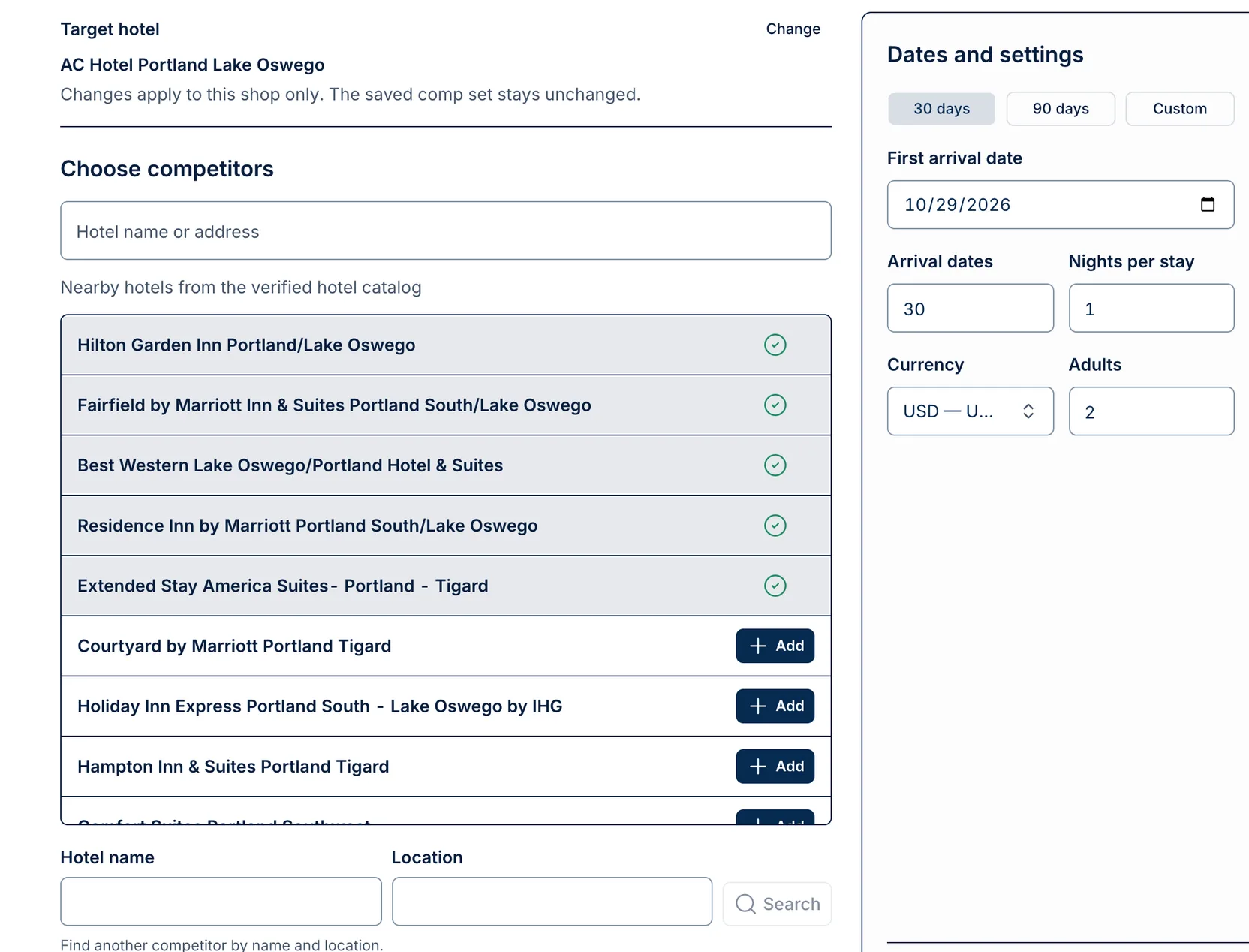
The screenshot above starts from the comp set for AC Hotel Portland Lake Oswego, with five competitors selected:
- Hilton Garden Inn Portland/Lake Oswego
- Fairfield by Marriott Inn & Suites Portland South/Lake Oswego
- Best Western Lake Oswego/Portland Hotel & Suites
- Residence Inn by Marriott Portland South/Lake Oswego
- Extended Stay America Suites - Portland - Tigard
Below them, nearby hotels like Courtyard by Marriott Portland Tigard and Hampton Inn & Suites Portland Tigard wait with an Add button. The dates are set to 30 days from October 29, 2026, at one night per stay, in USD, for two adults.
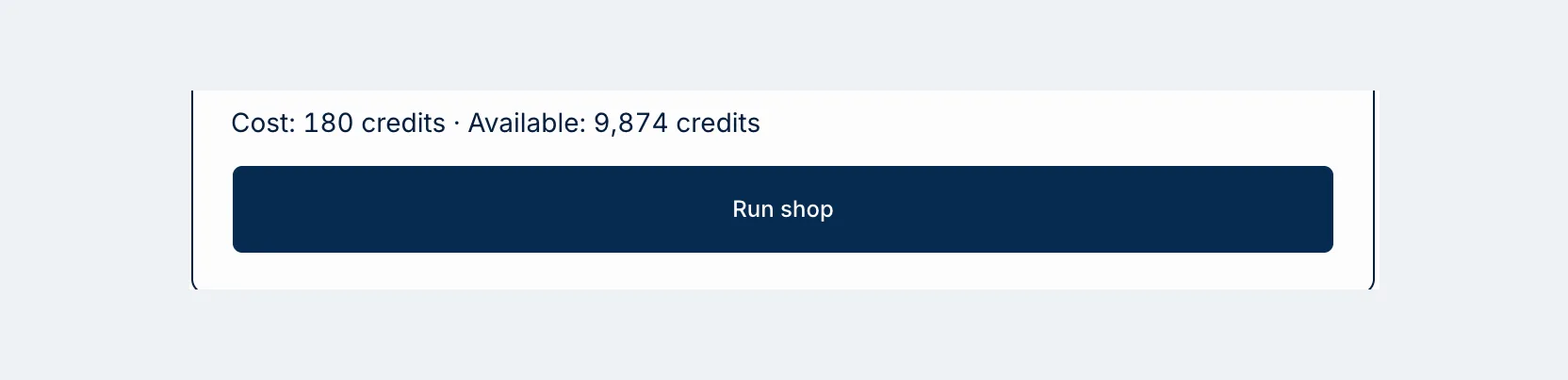
Six hotels times 30 dates is 180 credits, and the quote says exactly that, with 9,874 credits available.
Now imagine you add the Courtyard to see how it prices the same month. Seven hotels times 30 dates is 210 credits. Switch the original six to 90 days and it’s 540.
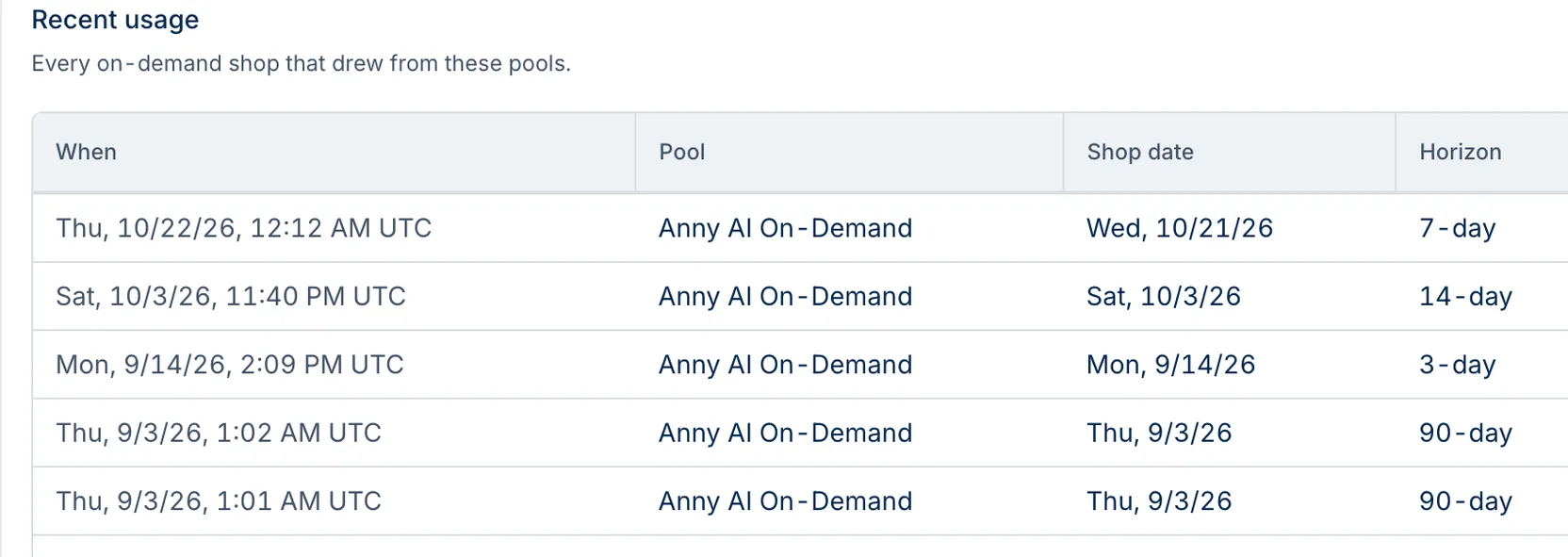
Recent usage shows what earlier shops used, and its Units column is credits. On September 3, 2026, two 90-day shops each covered six hotels. One used one night per stay and the other three nights, and both used 540 credits. The 3-day, 7-day, and 14-day shops used 18, 42, and 84: six hotels times the dates, every time.
Before your first ad-hoc shop
Hotel credits stay with their hotel. A new target hotel draws on Workspace shop credits, so top up before your first new-target shop.
The first arrival date has to be today or later at the hotel. And Anny AI runs one shop at a time for the same hotels and nights per stay, so wait for it to finish before you choose Shop again.
Questions worth an ad-hoc shop
Think of the question you couldn’t answer last week. It’s probably one of these:
- Dates further out. Shop a custom range for next spring or a big event, up to 365 arrival dates.
- A comp set you’re not sure about. Add or swap competitors for one shop. If the set earns its place, Save as comp set keeps it for later ad-hoc shops without starting recurring shops.
- A hotel you’re considering. Start with New target hotel and add its nearby competitors.
- Length-of-stay pricing. Set Nights per stay to 3 or 7 to see how the market prices longer stays, at the same cost as one night.
- The owner’s question. Add their address under Additional email addresses, and they get the CSV directly.
Owners, admins, and revenue managers can run ad-hoc shops and save comp sets. Owners and admins can also buy credits and see Recent usage below the form.
See the packages and credit top-ups at www.anny.ai/pricing.