
Your website sells “2 Queen Beds, Non-Smoking” for $139. Expedia sells “Standard Room, 2 Queen Beds, Non Smoking, Microwave” for $139. Same room? You’d know in a second. A parity check that lines up the lowest price on each channel never asks, and that’s how a team ends up chasing a “gap” between a king on one site and a suite on the other.
Portfolio parity in Anny AI compares the same room on each channel. When it pairs two rooms that aren’t the same, you correct it once, and the report stops comparing those two room names on every stay date and in every future rate check.
Why lowest-rate parity checks find gaps that aren’t there
The usual parity check compares the cheapest rate on your website with the cheapest rate on each OTA. It’s quick, and it’s wrong in both directions more often than you’d think.
The cheapest Expedia rate might be for a smaller room than the cheapest rate on your site, or for the same room under another name, because every channel writes room names its own way. A non-refundable rate, a member price, or a price without taxes can look like an undercut when it’s a different product. And a Direct price from this morning against an OTA price from yesterday tells you about timing, not parity.
Every false gap costs you a call to your OTA market manager. Worse, the real gaps hide behind them.
How Anny AI decides two prices are comparable
Portfolio parity reads the latest completed rate checks for the next 30 arrival dates, for every active hotel you can access. By default it compares Direct with Booking.com, Expedia, Hotels.com, and Priceline. Anny AI pairs each OTA offer with the Direct offers from the same rate check, then looks at the room, the terms, and the timing before it calls anything a gap.
The room comes first, and so do your decisions about it: a pair you marked as different rooms, then the room types you saved. Where you haven’t decided, an AI room check reads both names next to every other room name that channel showed for the hotel. It compares beds, room tier, accessibility, and smoking, and answers “Likely same room”, “Room match is unclear”, or “Likely different room”. New room pairs get that check as the report loads.
Then the terms: occupancy, taxes and fees, cancellation, meals, payment, and member or mobile pricing. A known difference takes the pair out of the comparison. A term the listing doesn’t show stays unknown.
Then the timing. Both prices have to be from the last 24 hours, captured within 30 minutes of each other.
A matched-room gap is the same room, with the OTA lower than Direct by at least $5 (or 5 in the offer’s currency) and at least 3%. The same room with a smaller difference is within limits. A likely different room is a room mismatch, and Anny AI doesn’t compare those prices at all. Anything it can’t confirm as like-for-like, such as an unclear room match or a price older than 24 hours, goes to Needs checking.
Correct a room match once, for every stay date
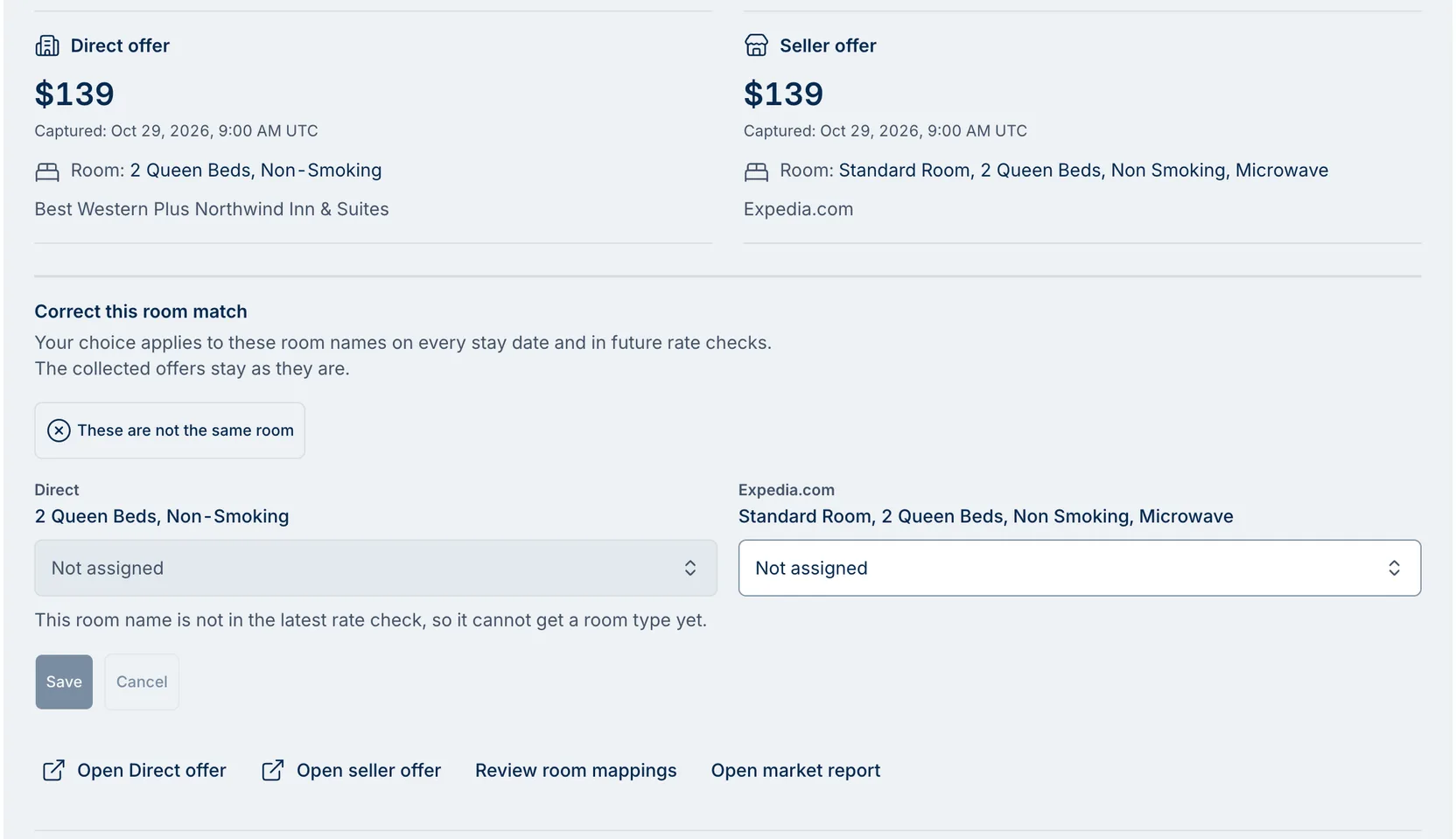
Open Market → Parity, choose Review hotel, then Review this comparison on any row. The Direct offer and the seller offer sit side by side, each with its price, capture time, room name, and channel. Below them, Correct this room match gives you two ways to fix it.
If they’re different rooms, choose “These are not the same room”, and Anny AI stops comparing those two room names for parity. If they’re the same room, use the room-type menu under each name. It says Not assigned until you choose. Put both names in one room type, or pick New room type to start one.
Choose Save. The hotel’s statuses and counts update on every stay date, and Undo puts it back. The collected offers stay as they are.
What zero price gaps means on a parity report
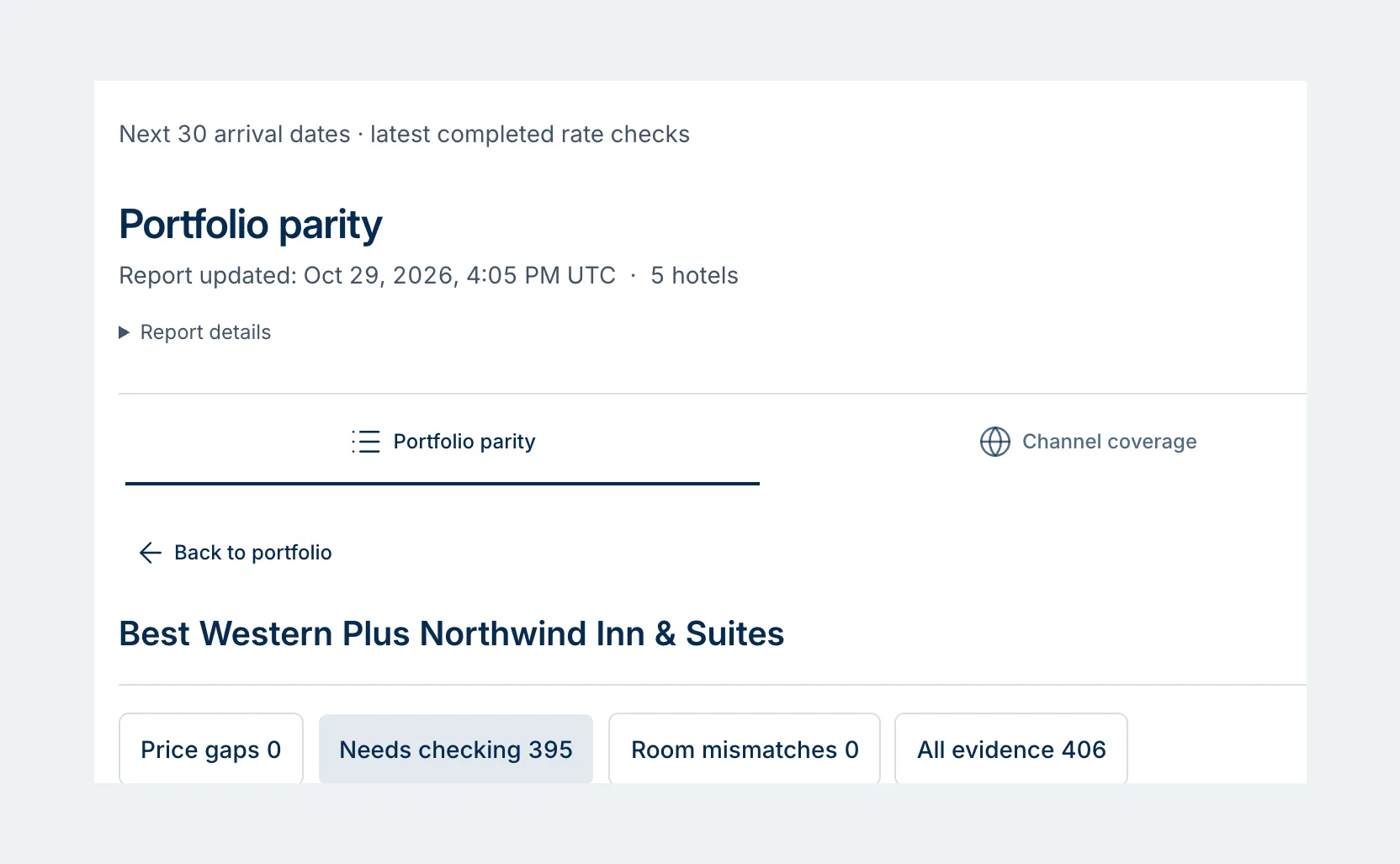
On October 29, 2026, Portfolio parity covered five hotels. At Best Western Plus Northwind Inn & Suites it held 406 comparisons across the next 30 arrival dates: 0 price gaps, 0 room mismatches, and 395 that needed checking.
So zero gaps is a starting point here. Most of those comparisons are waiting for a room decision or a fresher price, and the report lists each one so you can settle it.
The comparison in the first screenshot is one of them. Both offers were $139, both captured at 9:00 AM UTC on October 29. The prices match, so the question is the room. Expedia’s name adds “Standard Room” and “Microwave”, the Direct name mentions neither, and Anny AI marked the match as unclear.
If that were your hotel, it’s a quick call. If every two-queen room has a microwave, it’s the same room. Put both names in one room type, and $139 against $139 has no gap to report. If the microwave room is its own room type, choose “These are not the same room” and Anny AI stops comparing that pair. Either way, one decision covers that pair of names on all 30 dates and on every rate check after.
What one correction covers
A correction applies to one hotel, one channel, and one pair of room names. If Booking.com shows the same pairing, correct it there too.
A room name can get a room type once it appears in the latest rate check. That’s why the Direct menu in the first screenshot is locked. “These are not the same room” works either way.
Portfolio parity uses no shop credits. Refresh report reloads the latest rate checks without starting a new shop. To add channels beyond the four defaults, turn on Include other OTAs in this view. You choose the channels that count under Monitored Parity Channels when you edit a comp set.
Start with the price gaps
Tomorrow, open Parity and start with the Price gaps filter. Those are matched-room gaps, where an OTA undercut you on the same room by enough to matter, and Open seller offer shows you the listing before you call anyone.
Then work through Needs checking by room name, not by date. The same pair of names tends to repeat across dates, and one correction covers all of them. If the busy season is coming, set up room types first. On your hotel’s Rooms tab (Hotels, then your hotel, then Rooms), AI match room types drafts a grouping you can adjust. And when you want to go over gaps as a team, Digest preview puts the largest matched-room gaps first.
Every role can open Parity for the hotels it can access. Owners, admins, and revenue managers can correct room matches and edit room types.
Parity comes with every Anny AI Market Intelligence plan. See how Anny AI shops rates at www.anny.ai/hotel-rate-shopping.