
You’re on the rate grid and Friday looks off. Your hotel sits under three competitors, and the next question is obvious: by how much? Answering it usually means reading across a row and doing the subtraction yourself, or pasting numbers into a chat tool that has never seen your screen.
Anny Chat sits beside every page in Anny AI for exactly that moment. Open it where you’re working, ask in your own words, and Anny AI answers from the same view you’re looking at.
Why a general AI assistant can’t tell you why Friday looks low
An AI assistant only knows what you tell it. Ask a general one why Friday looks low and you first have to explain the hotel, the dates, the channel, and who’s in your Comp Set. Then you paste in the rates and hope you copied the right row.
Even jumping to a separate chat page costs something. For a big question that’s fine. For a quick “why is this one different?”, it’s enough friction that the question usually doesn’t get asked. So we put the chat next to the page.
Anny Chat knows which page you asked from
Anny Chat opens as a panel on the right side of the page. The page stays where it is, so you can scroll, change dates, or switch tabs while the conversation stays open.
Each question carries the page you asked it on. On the Dashboard, that’s the tab, the hotels, the stay dates, the length of stay, the channel and filters, and the price you selected, if you selected one. Anny AI reads that same view and answers from it, so “this rate” means the rate you clicked.
Answers lead with the result. Ask who’s priced above you and the first line tells you, with each competitor’s price and the gap. Ask what moved and you get each competitor’s price before and after the change, plus when the rates were collected.
Anny AI also tells you when your screen is behind. If a rate check brought in new rates after you opened the page, the answer says so and gives the current figure. When the prices behind an answer are more than a day old, you can ask Anny AI to check those stay dates again, and an approval card shows the dates and the credits before anything runs. When an answer mentions a page in Anny AI, you can open that page from the answer, and the panel stays beside it.
One conversation follows you from page to page. Move from Today to Dashboard → Table and the thread stays put, with each question tagged with where you asked it.
Who’s priced above us on Friday, and by how much?
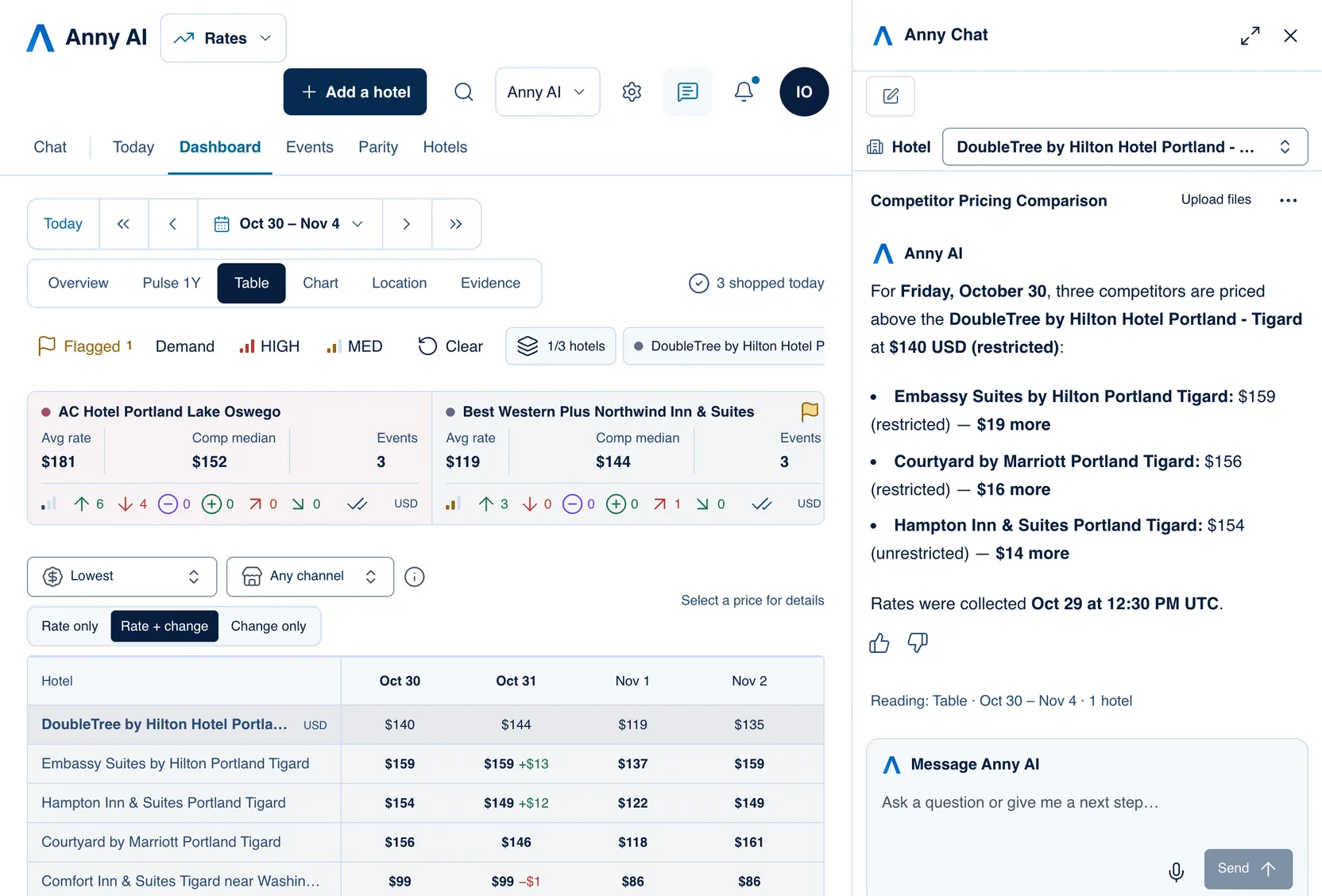
In the screenshot, the Dashboard table shows Oct 30 to Nov 4 for DoubleTree by Hilton Hotel Portland - Tigard and five competitors. Anny Chat is open on the right with the DoubleTree selected.
The question was “Which competitors are priced above us on Friday, Oct 30, and by how much?” Nobody had to say which hotel “us” is, or which rates. Anny AI read the table view the question came from.
The answer leads with the result. On Friday, Oct 30, three competitors are priced above the DoubleTree’s $140 USD restricted rate:
- Embassy Suites by Hilton Portland Tigard at $159 restricted, $19 more
- Courtyard by Marriott Portland Tigard at $156 restricted, $16 more
- Hampton Inn & Suites Portland Tigard at $154 unrestricted, $14 more
It ends with “Rates were collected Oct 29 at 12:30 PM UTC,” so you know how old the comparison is. The same figures sit in the Oct 30 column right next to the answer.
Now look at the rate types. The Hampton price is unrestricted and the other two are restricted, so that one isn’t quite the same comparison. If it were your hotel, you’d check the Hampton’s restricted rate before you read too much into a $14 gap.
The line above the message box, “Reading: Table · Oct 30 – Nov 4 · 1 hotel”, is what the next question will read. The table already shows Embassy Suites and Hampton Inn up $13 and $12 on Saturday, Oct 31, since the previous rate check. So the natural follow-up is “What about Saturday?”, and you can ask it exactly like that.
Asking from a price, a hotel card, or search
You don’t always have to type the whole question. Select a price on the Dashboard table and ask “Why is this rate so low?” Anny AI treats “this” as the price you selected. On Today, ask who moved a date, and you’ll get each competitor’s price before and after.
Dashboard hotel cards have an Ask Anny button that opens Anny Chat with a question already written, quoting the figures on the card. On Dashboard → Evidence, Ask Anny names each figure’s source, stay date, and collection time.
From anywhere, press ⌘K (Ctrl+K on Windows) and type a question. When search finds no match, it offers Ask Anny with your words, and Anny Chat opens with them ready to send. A hotel’s search result also offers Ask Anny about that hotel.
The chat icon sits at the top right of every page outside Chat. You can also press G, then A.
Fresh checks, hotel access, and your chat history
A fresh rate check uses shop credits, and Owners, Admins, and Revenue Managers can approve one. If you want the results kept in Anny AI with no results email, say so before you approve.
Answers cover the hotels your role can open. If a hotel is missing, ask an Owner or Admin to check your hotel access.
Every conversation from the panel lands in your Chat history. Choose Open in Chat to carry on in the full Chat page, or New conversation to start another. On a phone, Anny Chat fills the screen and closes when you follow a link in an answer, so you land on the page.
Try it on tomorrow’s grid
Tomorrow, when a date on the grid looks off, select the price and ask Anny Chat about it before you start the subtraction. Then ask the follow-up you’d ask a colleague. If you’d also like to ask from your own AI assistant, see www.anny.ai/mcp.
Anny Chat comes with every Anny AI plan, for every role on your team. You can compare the plans at www.anny.ai/pricing.