
Most hotel teams watch the next 30 to 90 days closely and look at the rest of the year when there’s time. There usually isn’t time. So March, June, and next fall sit unwatched, and that’s where a competitor can drop a whole weekend by 20% without anyone noticing until it’s three weeks out.
Market Pulse is how Anny AI watches the whole year. Detailed checks, the newest part of it, shows you which dates it flagged and what it found when it looked closer.
Why nobody shops all 365 days
A full rate shop pulls every hotel, channel, and room for each arrival date. That’s the right depth for the next few weeks. Doing it for a whole year every morning would cost a lot, and most of what came back would match yesterday.
So we split the job in two. A light read covers the whole year every day, and the full check runs only where the light read sees something odd. We’d rather check 25 dates properly than 365 badly.
How Market Pulse decides a date is unusual
Every day on a paid plan, Market Pulse reads the lowest published one-night rate for each hotel in your Comp Set, for every arrival date in the next 12 months.
Then Anny AI lines today’s curve up against as many as eight earlier reads and asks a few questions about each date. Did it move more than that date usually moves? Some dates bounce around every day, so a 5% swing on a quiet Tuesday can mean more than the same swing on a busy Friday. Does it break the local pattern, like a Thursday sitting 15% above the Thursdays around it? And did a hotel drift away from the Comp Set median when it usually sits right next to it?
Most dates pass. When one doesn’t, Anny AI runs a detailed check on it: every hotel in your Comp Set, on every channel, for that one night. Now you have the rooms, channels, and booking details behind the signal, not only a lowest price.
Reading the Detailed checks list
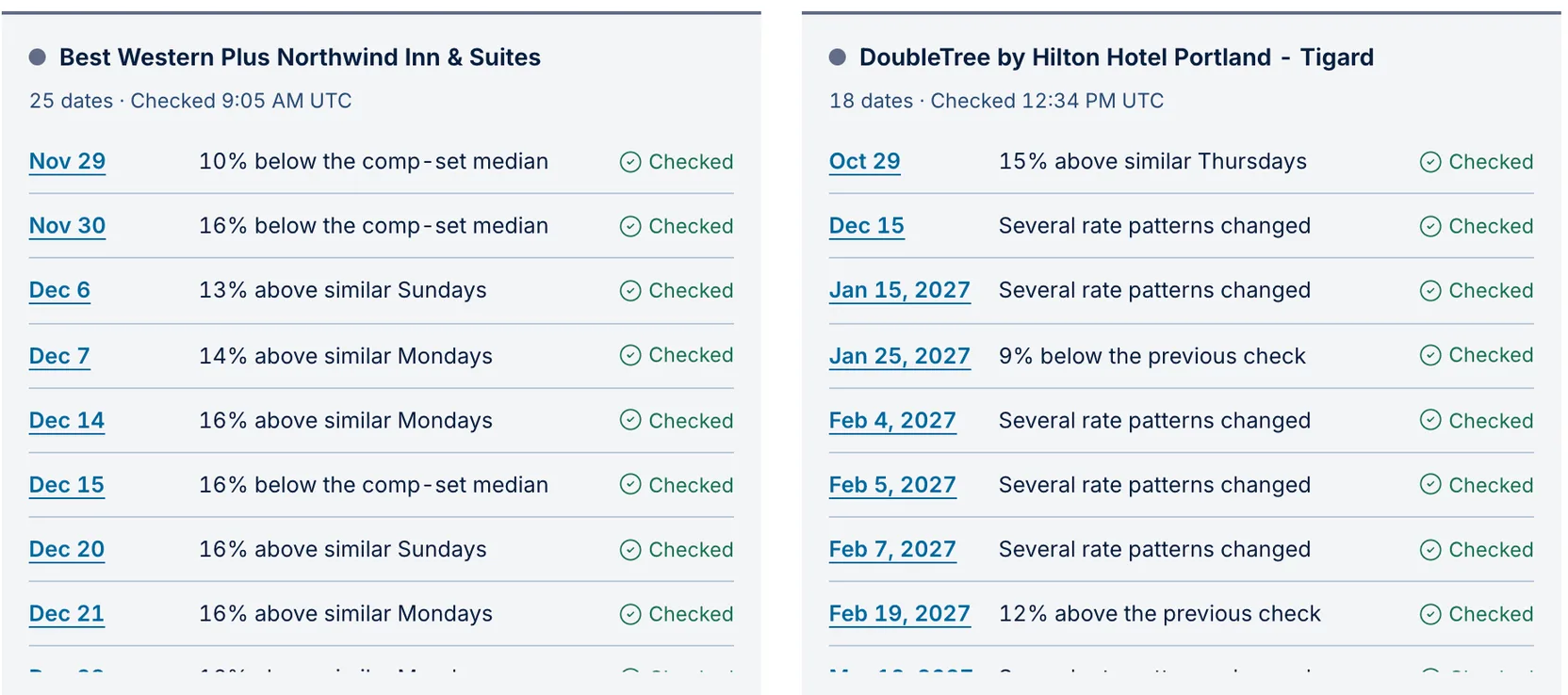
Detailed checks sits at the bottom of Today and of Dashboard → Overview. Each hotel gets a card with the dates Anny AI checked in the last seven days. Every date carries its reason in plain words, like “10% below the comp-set median” or “15% above similar Thursdays”, and whether the check finished, is still running, or failed.
Click a date and Anny AI opens the Dashboard table on that hotel and stay date, with the full rates from every hotel in the Comp Set.
Two dates from one Portland morning
In the screenshot above, Anny AI ran detailed checks on 25 dates at Best Western Plus Northwind Inn & Suites and 18 at DoubleTree by Hilton Hotel Portland - Tigard on October 29. Two of the Best Western’s reasons stand out.
Nov 29 came in 10% below the comp-set median. That’s the Sunday after Thanksgiving. If it were your hotel, the first question is whether that’s a deliberate push or a rate nobody touched when the holiday rates went in.
Dec 7 sits 14% above similar Mondays. One Monday priced well above its neighbors usually means a group or something happening in town. It’s worth knowing which.
Neither reason tells you what to charge. It tells you which date to open first, and the full check is already waiting when you get there.
How many dates it checks, and when
Anny AI runs detailed checks on up to 25 dates per Comp Set each day, starting with the most unusual, and it won’t check the same date twice within 24 hours. None of it uses your shop credits.
Sometimes a hotel’s one-night rate simply disappears. Around holidays that’s usually a minimum-stay rule, so Anny AI checks the date again at three nights. Set Length of stay to 3 nights in the table to see what came back.
A new Comp Set needs a few days of history before Market Pulse knows what normal looks like. The first read sets the baseline.
See the whole year at once
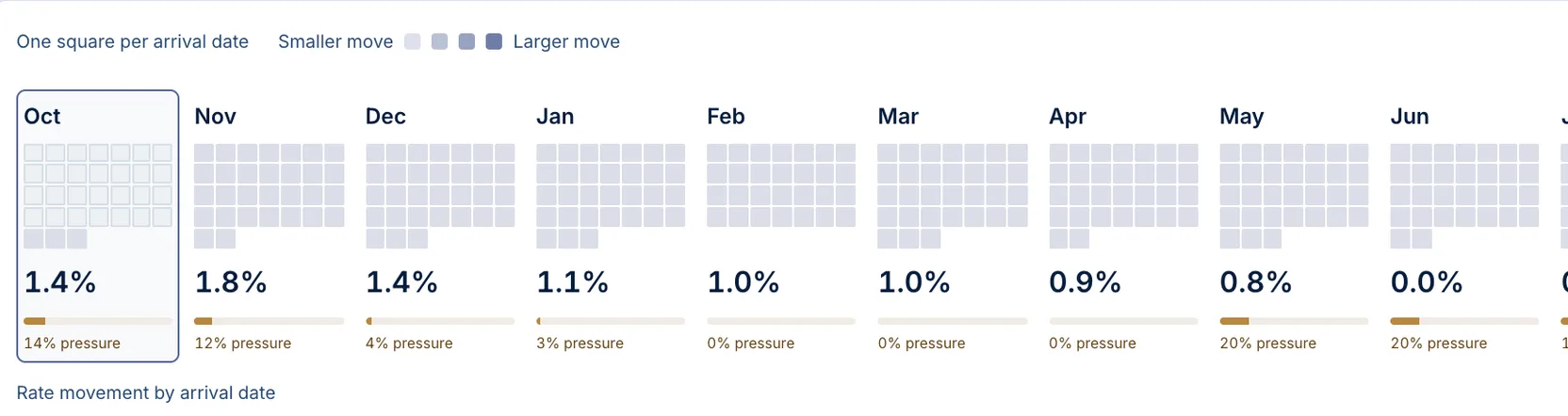
If you’d rather see the year than a list, open Dashboard → Pulse 1Y. It shows how much rates typically move each month for your hotel and your Comp Set, with one square per arrival date.
Where to start tomorrow
Open Today and read Detailed checks before you open the grid. Three flagged Saturdays in a row at one competitor is usually a decision someone made, not noise. If your own hotel shows “Several rate patterns changed”, check whether someone loaded new rates or a channel dropped a rate plan. And when a date months out jumps across the whole Comp Set, look at your tracked events for that week.
Market Pulse runs every day on every paid Anny AI plan. You can compare the plans at www.anny.ai/pricing.