
Most hotel competitive analyses start the same way. Someone opens each competitor’s listing, copies review scores into a spreadsheet, adds a few amenities from memory, and pastes in rates from the last shop. It eats an afternoon, and nobody volunteers to do it again next quarter.
Competitive reports in Anny AI do that legwork from Chat. Ask how your hotel compares with its Comp Set, and Anny AI collects guest ratings, amenities, listing photos, and your latest rates for each hotel, then lays out what it found as a SWOT you can save, share, and run again next month.
One review score per hotel hides the story
A spreadsheet usually holds one rating per hotel, often from whichever site someone checked first. But guests on different sites can see your hotel very differently. You can lead the field on one platform and trail it on another, and a single number blends the two into something that’s true nowhere.
Rates and ratings live in different places too. You might know you’re cheaper than the Comp Set and a little behind on reviews. You rarely see both on one page, for the same hotels and dates, with the source behind each number.
Ask Chat how you compare with your Comp Set
Open Chat, choose your hotel, and ask in your own words, something like How do we compare with our Comp Set on amenities, guest ratings and rates?
Nothing runs yet. Anny AI first opens a panel called What should Anny AI compare? so you can check the scope. It repeats your question and lets you pick the hotels. My Comp Set selects every hotel in your Comp Set, and Comp Set and nearby hotels also offers up to eight nearby hotels you can add. Then you choose what to check (amenities and photos, guest ratings, and rates from your latest shops) and the arrival dates, which default to the next 7 and go up to 31.
Choose Compare your hotel with 5 others, and keep chatting while it runs.
Where the evidence comes from
For each hotel, Anny AI searches public hotel listings and review sites and keeps only results that match the hotel’s website, phone number, or street address. Rates come from the shops your Comp Set already ran.
Anny AI then builds the report with fixed rules over that evidence. We chose rules because a finding you can’t trace isn’t much use in an owner meeting. A rating gap has to be at least 0.1 points to count as a finding, a rate gap has to be at least 3%, and every finding links to the sources behind it.
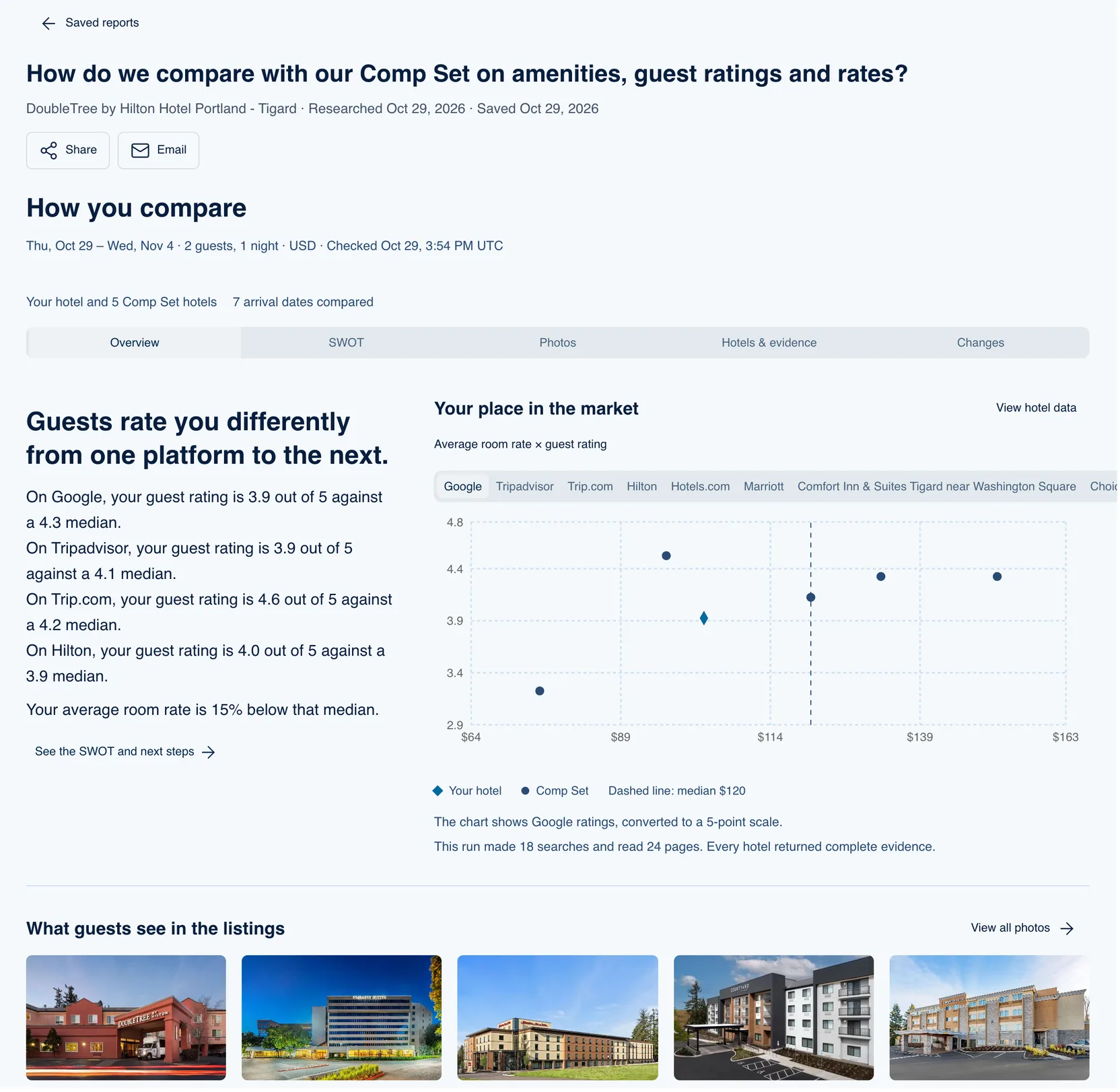
Reading the How you compare panel
The report opens in a panel called How you compare, with five tabs:
- Overview, with a one-line verdict, your rating on each site against the median of the others, your average rate against their median, and a chart called Your place in the market that plots average room rate against guest rating
- SWOT, where each strength, weakness, opportunity, and threat comes with its evidence, a Review supporting evidence link, and a Next step
- Photos, the listing photos Anny AI already has for each hotel
- Hotels & evidence, what Anny AI found for each hotel, with its sources
- Changes, on a saved report, what moved since your previous saved report for that hotel
Choose Save report to keep it. A saved report keeps its question, hotels, dates, and evidence, and later research never changes it.
A Tigard DoubleTree that guests rate differently on every site
The screenshot above is a saved report for DoubleTree by Hilton Hotel Portland - Tigard against five Comp Set hotels, for arrival dates Thursday, October 29 to Wednesday, November 4, 2026, at 2 guests and 1 night.
The verdict reads “Guests rate you differently from one platform to the next,” and the numbers back it up. On Google the hotel scores 3.9 out of 5 against a 4.3 median, and on Tripadvisor it’s 3.9 against 4.1. On Trip.com it’s 4.6 against 4.2, and on Hilton 4.0 against 3.9. One average would have hidden all of that.
The average room rate sits 15% below the median. On the chart, the dashed line marks the $120 median, and the hotel’s diamond sits left of it and below most of the Comp Set on Google ratings. The note under the chart says the run made 18 searches and read 24 pages, and every hotel returned complete evidence.
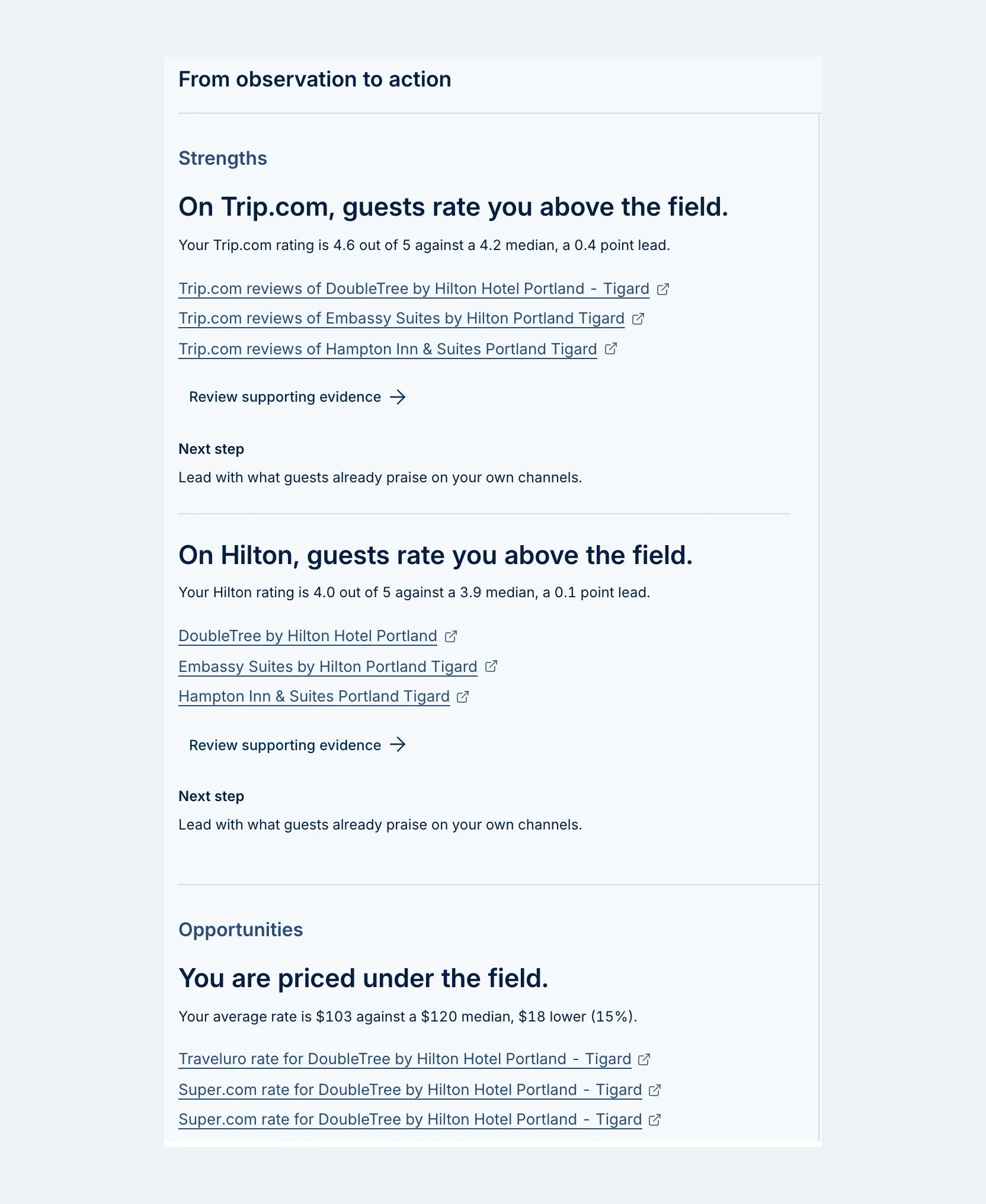
The SWOT turns those numbers into findings. Strengths opens with “On Trip.com, guests rate you above the field,” 4.6 against 4.2, and notes the Hilton rating leads by 0.1 points. Its next step is “Lead with what guests already praise on your own channels.”
Weaknesses covers the other side: on Google and Tripadvisor, guests rate the field above you. The next step there is “Read the recent reviews behind that gap before changing price.”
Opportunities says “You are priced under the field.” The average rate is $103 against a $120 median, 15% lower. And Threats names a hotel: “Hotel deLuxe is cheaper and rated at least as well.” It averages $96 and is rated 4.6 out of 5 on Tripadvisor.
If that were your hotel, the opportunity and the weaknesses pull in different directions. There’s room under the median, but the two sites where you trail are a good reason to read your reviews before you close that gap. The threat tells you which competitor to watch on the dates you still need to fill. The pricing call stays with you. The report puts the evidence for it in one place.
What a report covers, and what it costs
A report covers your hotel and up to five others, so with a larger Comp Set, pick the five that matter most for your question. Nearby hotels outside your Comp Set get ratings, amenities, and photos, without rates.
Rates come from what your Comp Set shops already collected, matched to your Comp Set’s stay length and currency. If you want today’s rates in the report, run a shop first. The report itself doesn’t use shop credits.
Save one now so next month has something to compare
The Changes tab compares a saved report with your own previous saved report for the same hotel. Your first saved report shows “Your first reference point”, which is the best reason to save one today. Save another next month, and Changes shows which rates, ratings, amenities, and hotels moved.
Every report you save lands in Saved reports, in the Workspace menu, along with any report a teammate shared with you. Share lists only teammates who can see the hotel, and they get the report without the conversation it came from. Email sends it to you and the teammates you shared it with, which is handy the morning of an owner meeting.
The SWOT is also a quick listing audit. When it says “The field lists what you do not,” check whether you actually offer those amenities and your listing leaves them out. For a portfolio, choose All hotels in Chat and ask about several at once. One conversation covers up to 10 hotels, each against its own Comp Set.
Run your first report tomorrow
Open Chat, pick your hotel, and ask how you compare with your Comp Set. Read the weaknesses before the opportunities, then save the report so next month’s has something to measure against.
Anyone on your team who can see the hotel can run and save a report. Competitive reports build on your Comp Set and the rates your shops collect, and you can compare the plans at www.anny.ai/pricing.