
Every morning, someone on your team opens the rate grid and tries to answer one question: what changed that I need to care about? Ask your revenue manager and your front desk lead, and you’ll get two different answers. Both are right. The revenue manager wants the dates where you’ve drifted from the Comp Set. The front desk wants the busy nights in the next few weeks.
Your daily brief gives each of them their own version. It sits on Today, Anny AI writes it after every daily rate check, and you can read it as Revenue, Hotel owner, Front desk, or Sales.
Why a rate grid doesn’t tell you where to look
A rate grid shows everything at once. Five competitors across 30 arrival dates is already 150 prices before you add channels, and on most mornings most of them look like yesterday.
So the useful part, the few dates that actually moved, sits inside a lot of numbers that didn’t. And which dates matter depends on who’s asking. Revenue cares that one night sits well above the market. Sales cares about an event five months out.
What goes into each role’s brief
After the daily rate check finishes, Anny AI reads what changed for each hotel across the next 365 stay dates. That covers your own rate changes, competitor moves, your position against the Comp Set, potential parity gaps, competitor availability, Market Pulse findings, and your tracked events.
Then it picks what matters for each role:
- Revenue leads with your rate changes, market movement, potential parity gaps, and Market Pulse findings, with competitor moves and tracked events as context.
- Hotel owner leads with changes in your price position and in competitor availability.
- Front desk covers tracked events in the next 30 days.
- Sales covers tracked events across the year.
Each role’s brief draws on up to 10 findings, with no more than three for any one stay date, spread across the next month, the next quarter, and dates further out. That keeps it short enough to read before the morning meeting. Anyone can switch between the four, so a GM covering for the revenue manager can read Revenue.
Each brief reports what changed, with the prices, channels, and collection dates behind it. Before Anny AI saves a brief, it checks every statement against the rates and events behind it and removes any statement it can’t support. What to do about it stays with your team.
With two or more hotels, the Executive summary tab reads across your hotel briefs. It pulls out the shared dates, the contrasts, and the exceptions, so you don’t read the same date three times. Choose View all hotels on Today to see it.
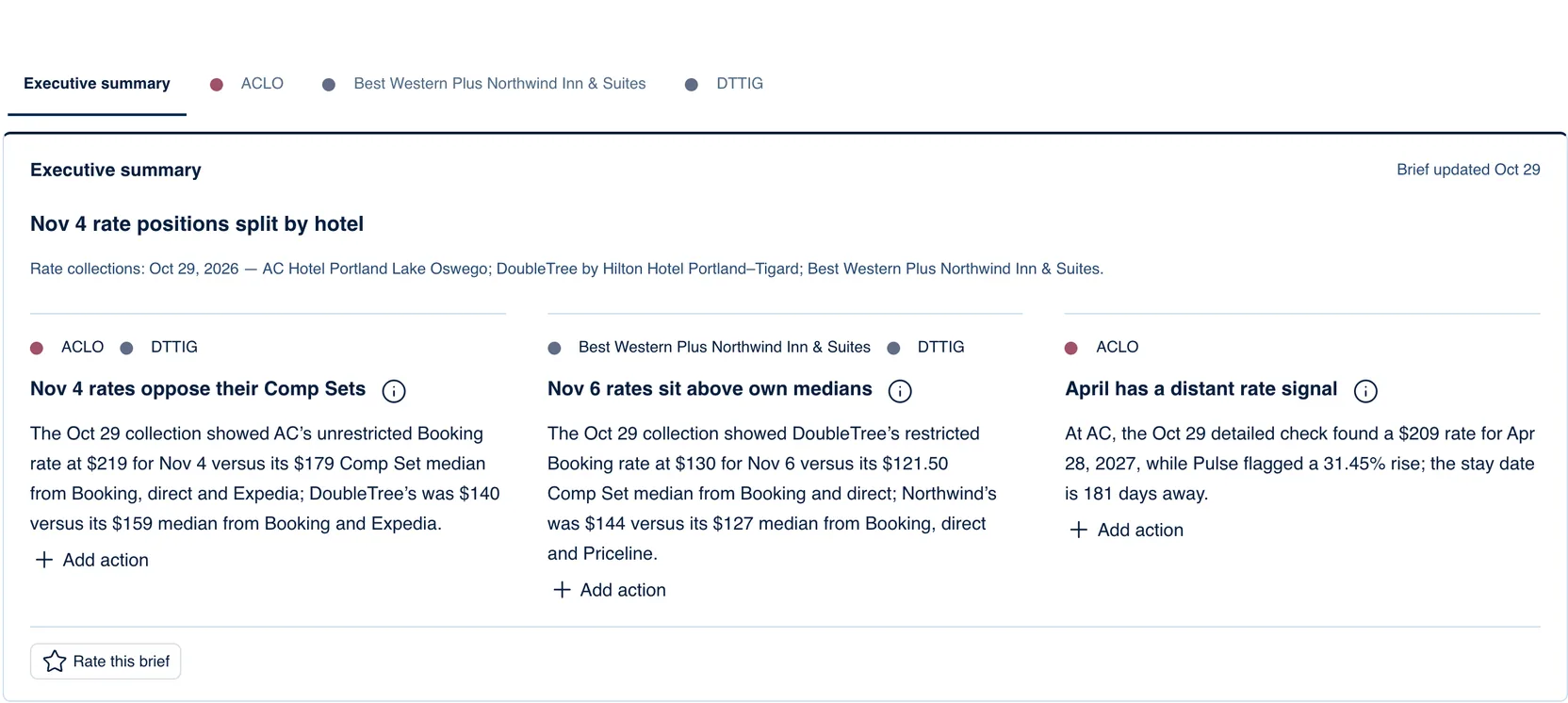
Three Portland hotels in one Executive summary
The screenshot shows the Revenue brief’s Executive summary for three hotels in the Portland area. It reads “Brief updated Oct 29”, and the rates behind it come from the Oct 29 collection for all three.
The headline is “Nov 4 rate positions split by hotel.” The first point explains it. AC Hotel Portland Lake Oswego’s unrestricted Booking rate for Wednesday, Nov 4 was $219, against a $179 Comp Set median from Booking, direct, and Expedia. That’s $40 above. DoubleTree by Hilton Hotel Portland - Tigard was at $140, against a $159 median from Booking and Expedia. That’s $19 below.
Same night, two hotels on opposite sides of their markets. If both were yours, Nov 4 is the first date to open.
The second point covers Friday, Nov 6, where two hotels sit above their own medians. The DoubleTree’s restricted Booking rate was $130 against $121.50. Best Western Plus Northwind Inn & Suites was at $144 against $127.
The third point looks much further out. At the AC, the Oct 29 detailed check found a $209 rate for Apr 28, 2027, and Market Pulse flagged a 31.45% rise. That stay date is 181 days away. A 30-day grid won’t show April for months.
Turn a brief point into an action item
Each point ends with Add action. Choose it and the New action item dialog opens with the point’s title at the top. For a point that covers more than one hotel, choose the hotel first.
Pick one of the suggested actions for the role you’re reading, or type your own. For Revenue, the suggestions are:
- Review our rate against the Comp Set
- Check our rates on the booking sites
- Review stay restrictions
- Recheck competitor rates before the stay date
- Update the forecast
Add an owner and a due date if you know them, then choose Add. Nothing is saved until you do.
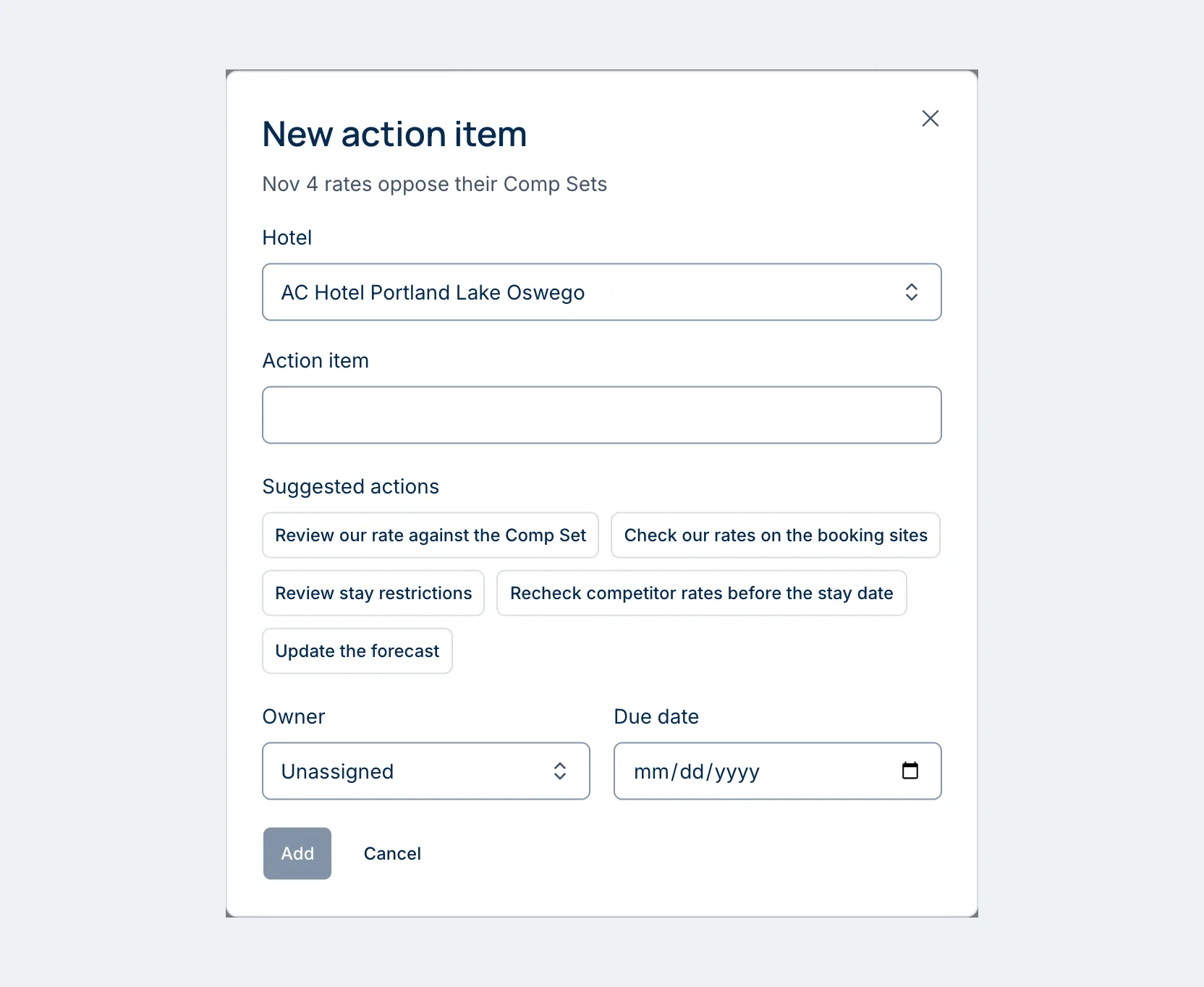
The action keeps the point’s words, so whoever picks it up can see why it’s on the list. It appears under Action items on Today, with Mine and Team tabs, and on the hotel’s Hotel actions tab. Owners, Admins, Revenue Managers, and Hotel Members can add action items. Viewers can read every brief and open its evidence.
Checking the brief’s work
When a point names stay dates, See evidence opens Dashboard → Evidence with the items the point used marked Cited. If a point seems off, that’s the fastest way to see what it was built on.
At the end of each card, Rate this brief takes a score from 1 to 5 and an optional note. Your note goes straight to our team.
Why some mornings the brief is one line
Anny AI writes a new brief after the daily rate check and after you add or change a tracked event. Today picks it up on its own while the page is open, and “Brief updated” shows when.
Front desk and Sales briefs follow your tracked events, so track the events near your hotel and those briefs fill in. On a quiet day, a role’s brief can be one line: “No supported observations for this role in the available data.”
Read it before the morning meeting
Tomorrow morning, open Today, pick the role closest to your job, and read the brief before you open the grid. If a point is worth doing something about, add it as an action with an owner while you’re there.
If you’d rather get it by email, open your hotel’s settings and, under Emails for this hotel, set Brief in my report emails to the brief you want, or choose No brief to leave it out. Owners and Admins set it for each address under Report recipients.
Your daily brief is on for every role, on every Anny AI plan. You can compare the plans at www.anny.ai/pricing.