
A competitor jumps $20 on a Thursday. Did the market tighten, or did someone over there just change their mind? Rates alone can’t tell you. What’s left to sell tells you more: when competitors stop offering some of their room types, the market is filling.
That’s the idea behind the estimated demand level Anny AI shows for each arrival date. And when you want to check its work, Show demand calculation opens the counts behind any level.
Why a competitor’s rate can’t tell you demand
Rates move for a lot of reasons: a brand promotion, a channel test, a new revenue manager, a typo. Reading demand from a competitor’s rate means guessing at their reasons.
Room availability is closer to what you care about. But a raw count doesn’t travel well. A limited-service hotel might show six room types on a normal night, and a full-service hotel 30. Four room types on offer means something very different at each. So each competitor has to be measured against its own normal.
How Anny AI estimates demand from competitor availability
After each full rate shop, Anny AI works through four steps for every arrival date and length of stay:
- For each competitor, it counts the distinct room types each channel offers for that date. Your own hotel stays out of the count, so the read is about the market around you.
- It finds that competitor’s usual level by looking at the same competitor and channel across at least five checked future dates, and takes a level near the top of its usual range. That’s the baseline.
- It adds up the channels with enough history and divides room options now by the baseline. That’s the competitor’s availability, where 100% is an ordinary day for that hotel.
- The median competitor in the Comp Set sets the level. Below 50% is High, 50% to under 75% is Medium, and 75% or more is Low.
Because each competitor is compared with its own usual level, High means tighter than this Comp Set usually is.
There’s one more step, and it ties this to Market Pulse. When a Market Pulse signal for that date is confirmed by a successful detailed check, Anny AI raises the level one step, up to High. The calculation shows that as Pulse +1.
So every level comes down to a count, a ratio, and a median, and you can check each one.
Reading the Demand row on the Dashboard
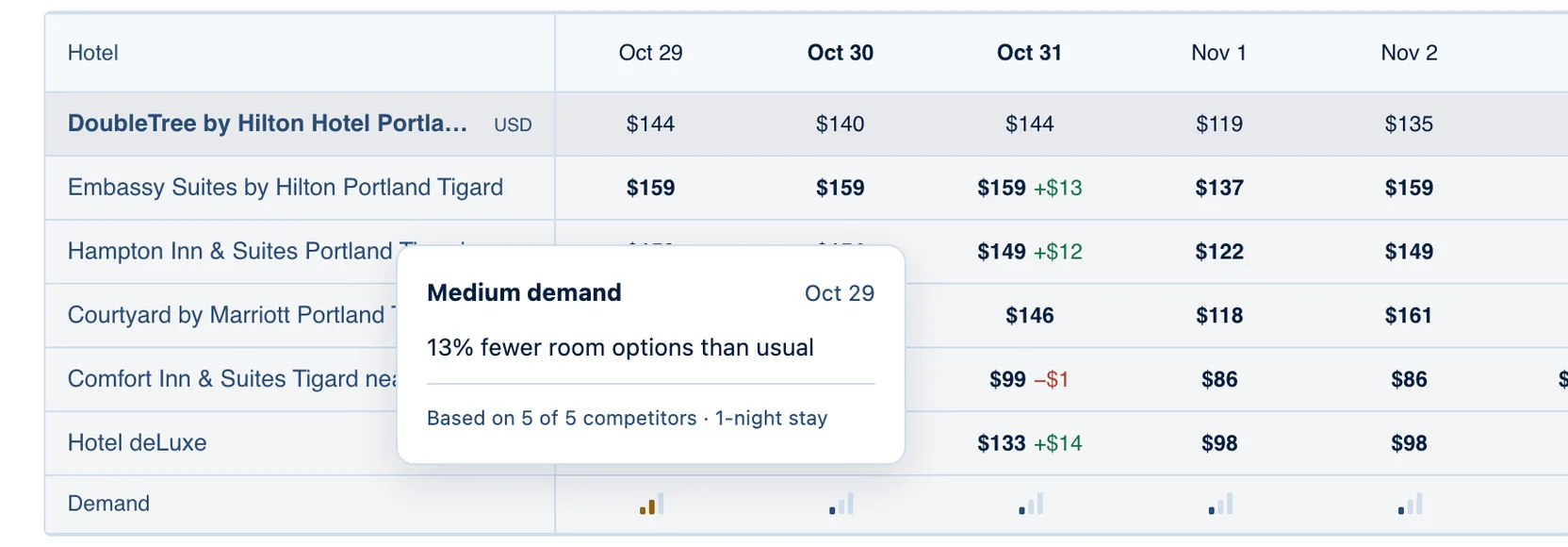
Open Dashboard → Table. Under each hotel and its Comp Set, the Demand row shows a three-bar level for each arrival date. Point at a level and you’ll see the level itself, such as Medium demand, how room options compare with usual, such as “13% fewer room options than usual”, and how many competitors counted for which length of stay. A date without enough evidence shows a dash instead.
Read the level first. The percentage compares room-type options with usual, and the same room type on two channels counts twice, so treat it as the detail behind the level.
To see the math, select a price in that date’s column, then choose Show demand calculation.
One Thursday in Tigard, step by step
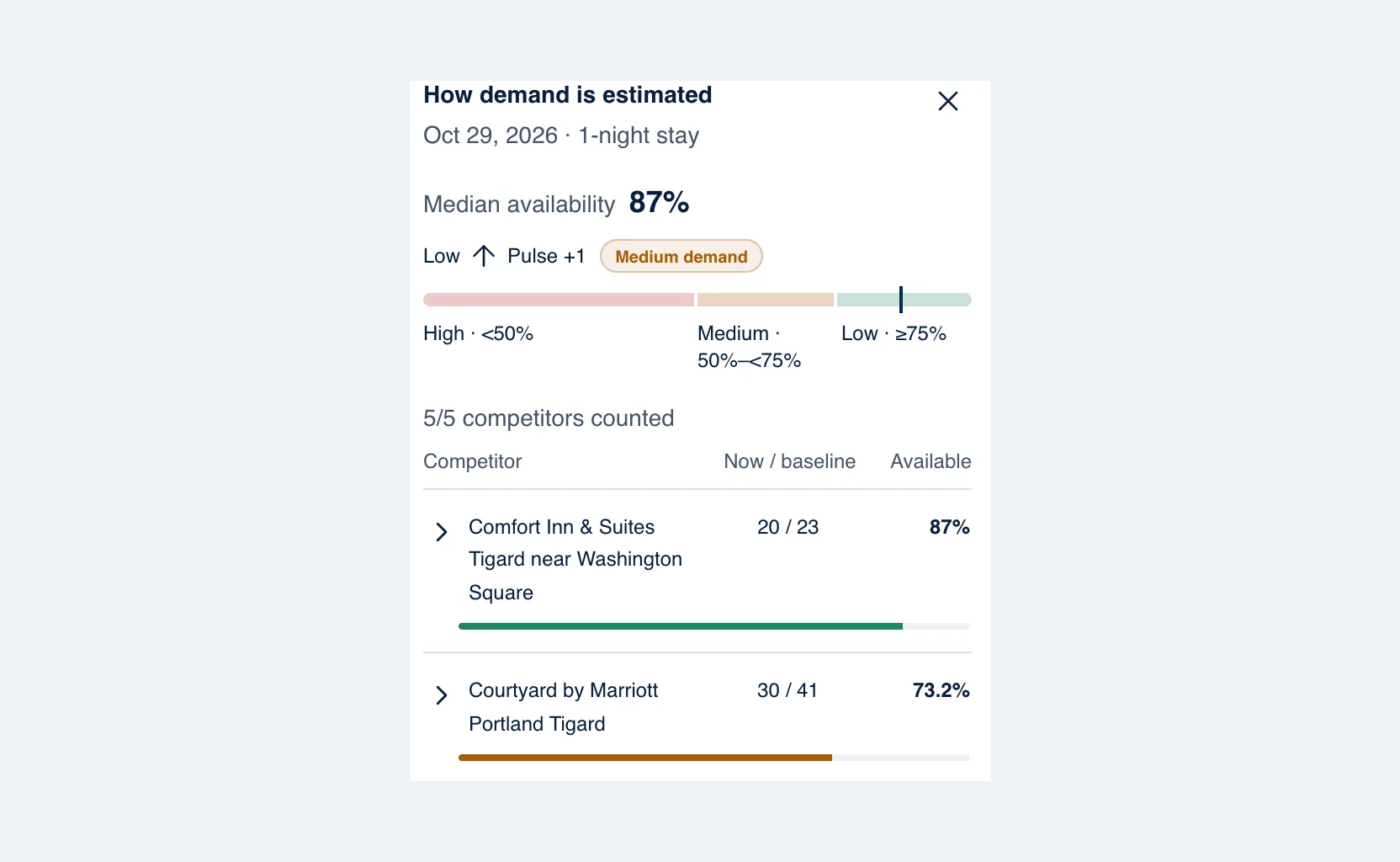
Take Thursday, Oct 29, 2026, for a 1-night stay at DoubleTree by Hilton Hotel Portland - Tigard. The Demand row says Medium demand, with 13% fewer room options than usual.
The How demand is estimated panel lists each competitor with Now / baseline: the room-type options it offers now against its usual level for that date and stay length. Comfort Inn & Suites Tigard near Washington Square offers 20 room options against a baseline of 23, so it’s 87% available. Courtyard by Marriott Portland Tigard offers 30 against a baseline of 41, or 73.2%. On its own, Courtyard would sit in Medium.
All five competitors counted, so the panel shows 5/5 competitors counted. The median of the five is 87%, which is where the tooltip’s “13% fewer room options than usual” comes from. On the scale, 87% reads as Low.
The line above the scale says “Low ↑ Pulse +1”. A Market Pulse signal for Oct 29, confirmed by a successful detailed check, raised the level one step to Medium demand.
So if that were your hotel, the middle of the Comp Set still looks close to an ordinary night. Courtyard sits well below that middle, and Market Pulse found something on that date worth a closer look. Start with Courtyard’s rates and the detailed check before you decide anything about the night. The detailed check is waiting in Detailed checks on Today.
When the level updates, and when it can’t
Levels update after every full shop, including the daily 30-day checks and the twice-weekly 90-day checks. Estimated demand costs nothing extra, because Anny AI calculates it from the shops you already run.
Anny AI needs at least two competitors with enough history to set a level, and each counted channel needs at least five checked dates. A new Comp Set fills in as its shops build that history.
Beyond the table, you’ll find the demand level for each date on Dashboard → Overview, and in shop reports as the Rate Grid badge, in the CSV export, and in the shop report email. Every role can see estimated demand, including Viewer.
Start with the High dates
Tomorrow, use the Demand → High filter on the Dashboard (there’s a Med filter too) and check your rate and restrictions on each date it shows. Open the calculation to see whether it’s one hotel or the market: one competitor at 40% is a different story from five competitors near 45%. Switch the length of stay, because a 1-night and a 2-night stay on the same arrival date can read differently.
And when a date reads High, check your tracked events for that week. We wrote up how Anny AI finds and tracks local events.
Market comparisons and availability-based demand signals come with every Anny AI Market Intelligence plan. You can compare the plans at www.anny.ai/pricing.