
A citywide conference or a sold-out concert can fill your town before any competitor moves a rate. The hard part is hearing about it in time. Events live on a dozen calendars: the arena, the convention center, the university athletics site, the tourism board, and a ticketing page for a show two towns over.
Anny AI reads those calendars for you. You can search for events in Chat and track the ones that matter, and the Events page keeps every tracked event for a hotel in one table your team can add to and fix.
Why the events spreadsheet always goes stale
Most hotel teams keep events in a spreadsheet, a shared calendar, or someone’s head. Someone checks the convention center site in January, adds the big ones, and the list slowly goes stale.
The bigger gap is the small stuff. One soccer match won’t fill a market. A soccer match, a college game, a concert, and two multi-day performances in the same week might. Those live on different sites, and nobody has time to check them all every week.
Where Anny AI looks for local events
Anny AI starts from your hotel’s demand drivers: the venues, attractions, campuses, and recurring events near the hotel. When you search, it picks up to eight of those places and reads each one’s events page. Then it reads the wider calendars, like city listings, the tourism board, the convention calendar, and festival organizers.
Each event comes back with its dates, venue, start time, distance from the hotel, and links to the listings it came from. Anny AI also gives each event an estimated demand level of Low, Medium, or High, based on what the listing publishes: the venue, the ticketing, how many days it runs, and how far its audience travels. When a venue and a ticket site list the same event, or a run is listed night by night, Anny AI combines the listings into one event.
There are three ways an event ends up tracked. Your hotel’s first rate shop also looks for local events across the same dates and tracks what it finds. In Chat, you can ask what’s happening near the hotel, select the events that matter, and choose Track selected. And Add event covers what only you know about, like a wedding block or a festival a guest mentioned.
One table of tracked events for each hotel
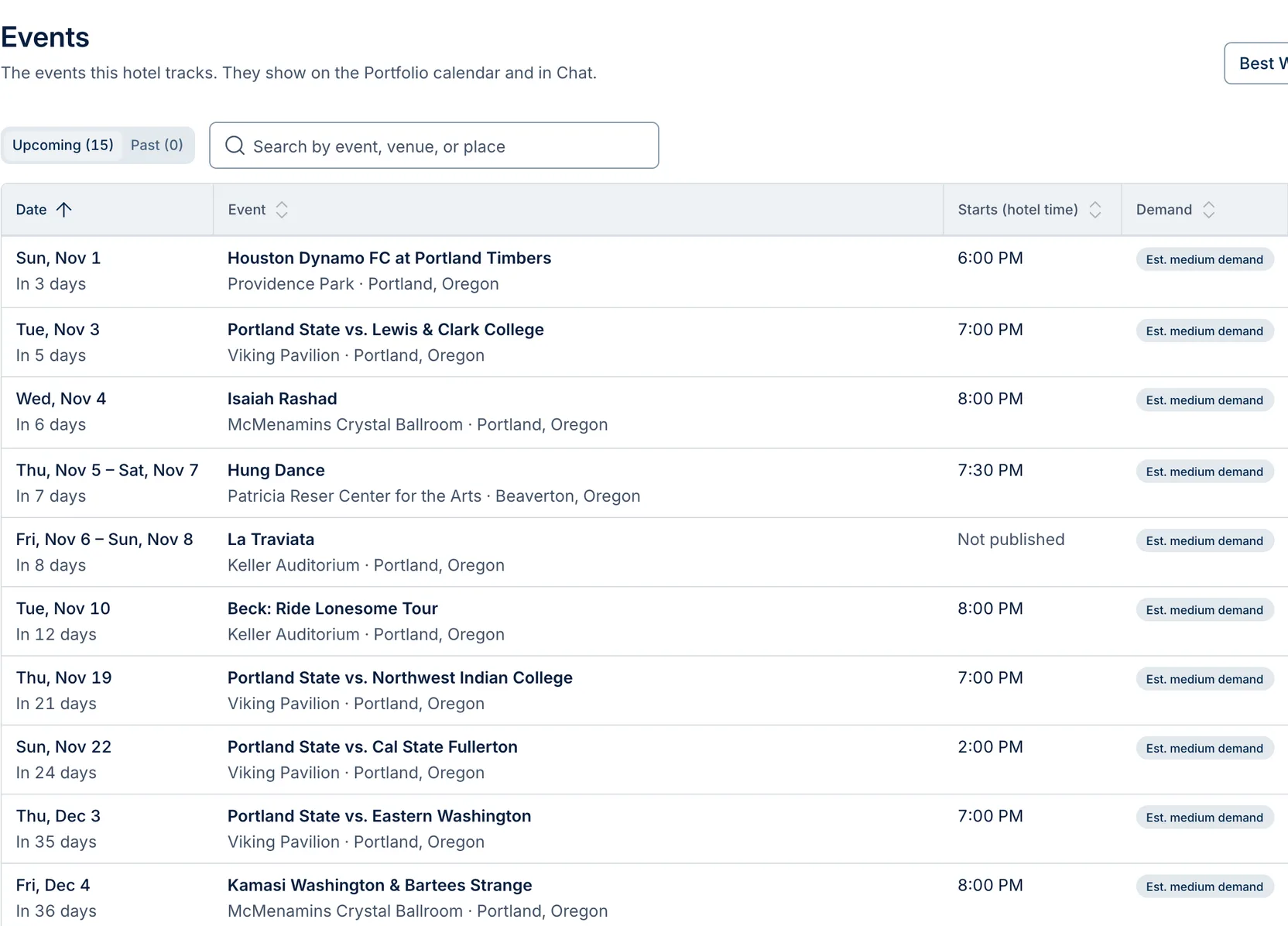
Choose Events in the top bar. With more than one hotel, choose the hotel at the top right. Each row shows the date and how many days away it is, the event and its venue, the start time in hotel time, the Demand estimate, and the Source, with a link to each listing. When a listing doesn’t publish a start time, the row says “Not published”.
Upcoming starts with the next event, and Past keeps what already happened. You can search by event, venue, or place, and sort by any column.
Choose Edit to correct the name, days, start time, venue, or demand estimate. Your changes stay as you set them, even when Anny AI finds more listings of the same event later. If two listings shown as one are really different events, choose Separate, and Anny AI keeps them apart from then on. The red bookmark button stops tracking an event after you confirm.
Five small events, one busy week in Portland
In the screenshot above, Best Western Plus Northwind Inn & Suites tracks 15 upcoming events, and the first week of November is full:
- Sun, Nov 1: Houston Dynamo FC at Portland Timbers, Providence Park, 6:00 PM
- Tue, Nov 3: Portland State vs. Lewis & Clark College, Viking Pavilion, 7:00 PM
- Wed, Nov 4: Isaiah Rashad, McMenamins Crystal Ballroom, 8:00 PM
- Thu, Nov 5 to Sat, Nov 7: Hung Dance, Patricia Reser Center for the Arts in Beaverton
- Fri, Nov 6 to Sun, Nov 8: La Traviata, Keller Auditorium, start time not published
None of these is a citywide event on its own. But on Friday, Nov 6, and Saturday, Nov 7, two multi-day performances overlap. If that were your hotel, those are the two nights to hold up against your rates and your Comp Set in Dashboard → Table.
Searching for events in Chat
A Chat search for Tigard, Oregon, covering Wed, Oct 28, 2026, to Mon, Jan 25, 2027, read 232 listings and found 49 events.
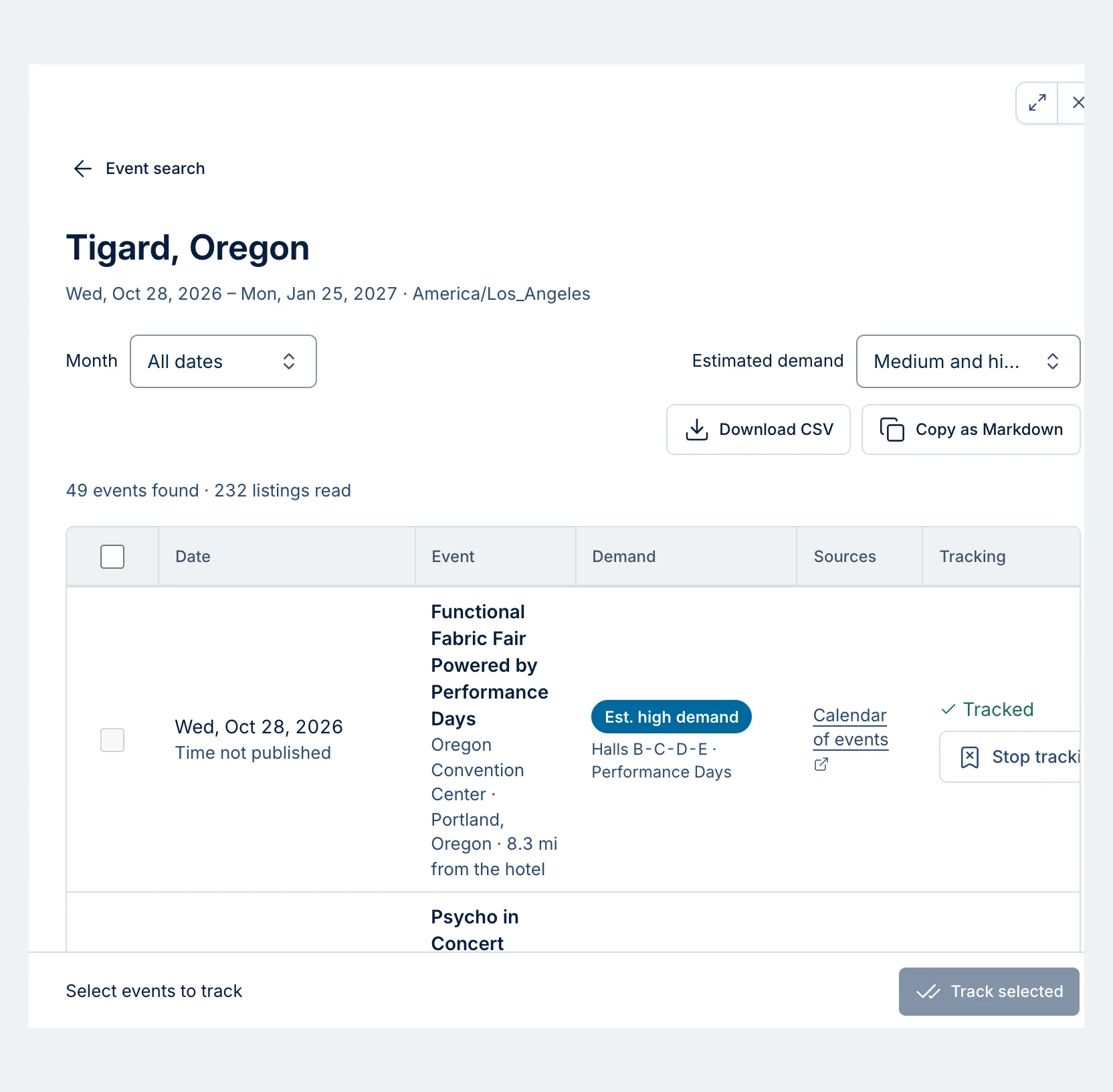
With Estimated demand set to Medium and high, the list opens on the Functional Fabric Fair Powered by Performance Days at the Oregon Convention Center in Portland, 8.3 miles from the hotel, with an estimated high demand. That one’s already tracked, so its row offers Stop tracking. For the rest, you’d select the events you want and choose Track selected.
Each search looks up to a year ahead and returns up to 50 events, higher-demand events first. In a busy city, search a shorter window or one venue so the smaller events still make the list. Anny AI runs up to 20 event searches per hotel each day. If you reach that, search again the next day.
Keep the list current with a weekly search
Ask Chat to repeat an event search every week, and it opens Set up a weekly search. Pick the day and time, how far ahead each run looks (one to 12 months), and which teammates get the results, then choose Create weekly search. If you only want to hear about changes, turn on Only notify when events are new or changed. New and changed events show up in the Notifications bell in the top bar.
Events are one half of the demand picture
An event’s demand level describes the event. For a read on how tight your market is, check the Demand row on your rates. We wrote up how Anny AI estimates demand from competitor availability.
Anny AI tracks the events it finds in published listings. Your private business won’t be in any listing, so add group blocks, a youth tournament your sales team booked, or a graduation weekend with Add event, and they sit beside everything else.
Tracked events also show on Today and in report emails, and Anny AI uses them in your daily briefs. On Dashboard → Location, Portfolio events sits beside the map. Every role can view events and search in Chat. Every role except Viewer can track, add, edit, and stop tracking events.
Try it on the next week that stands out
Next time a week looks busy on the Dashboard, open Events and see what lands on those nights. If nothing does, ask Chat what’s happening near the hotel that week, and track what belongs on the list.
Local event discovery and tracking come with every Anny AI Market Intelligence plan. You can compare the plans at www.anny.ai/pricing.