
Every hotel has a late check-out policy. Fewer have one written down that matches what the front desk actually does. The binder copy names a manager who left, the shared drive has three versions, and new hires learn the rule from whoever is on shift.
Anny AI Documents handles both halves of that. Anny AI drafts an SOP or policy from what it already knows about your hotel and asks about the parts only your team can decide. Once you publish it, Anny AI turns it into a course and quiz, assigns it to your team, and lets new hires practice the guest conversation out loud with an AI guest.
Why hotel SOP templates miss the rules that matter
A template gets you headings. It also gets you someone else’s check-out time, someone else’s fees, and an approver your hotel doesn’t have. Miss one while you fill it in, and your SOP states a rule nobody agreed to.
Then the document goes in a folder, and training means “read this and sign.” You don’t know who read it, or whether they could follow it with a guest standing at the desk.
How Anny AI drafts an SOP or policy for your hotel
On the Documents page, choose Write with Anny AI, or ask Chat, for example “Write a late checkout SOP for our hotel.” Pick the type of document (an SOP, policy, handbook, onboarding guide, training checklist, or job description) and say what it should cover. You can paste notes and choose up to 10 of the hotel’s documents to base it on.
Anny AI writes the draft from your request, the hotel details saved in Anny AI, and your team’s own documents, in your team’s words. Standard practice, such as recording a request in the reservation record, becomes plain steps.
When the draft needs a fact only your hotel can supply, such as a time, a fee, a limit, or who approves something, and none of those sources states it, Anny AI stops and writes a bold Confirm: question in that spot. We’d rather leave a visible question than a confident wrong number.
Revenue documents you start from Common documents, such as a rate parity policy or an event playbook, also draw on your Comp Set, rates, tracked events, and demand for the next 31 days.
A late check-out policy, from draft to publish
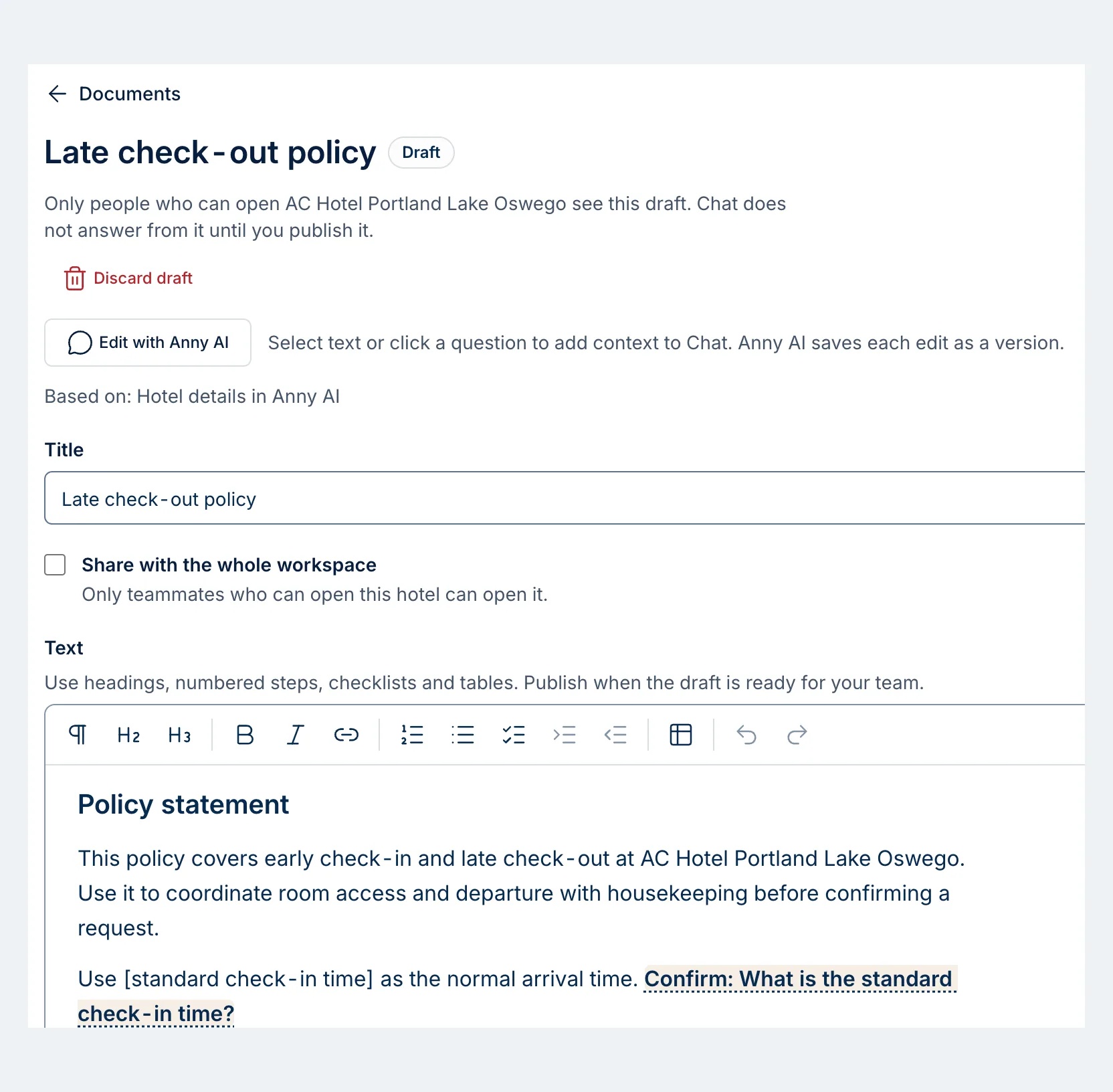
This draft covers early check-in and late check-out at AC Hotel Portland Lake Oswego. The Draft badge and the note under the title say who can see it: only people who can open that hotel. Chat doesn’t answer from it until it’s published. Based on names the source, the hotel details in Anny AI.
The policy statement already names the hotel and the point of the policy: coordinate room access and departure with housekeeping before confirming a request. The next line is where Anny AI stopped. It reads “Use [standard check-in time] as the normal arrival time,” followed by “Confirm: What is the standard check-in time?”
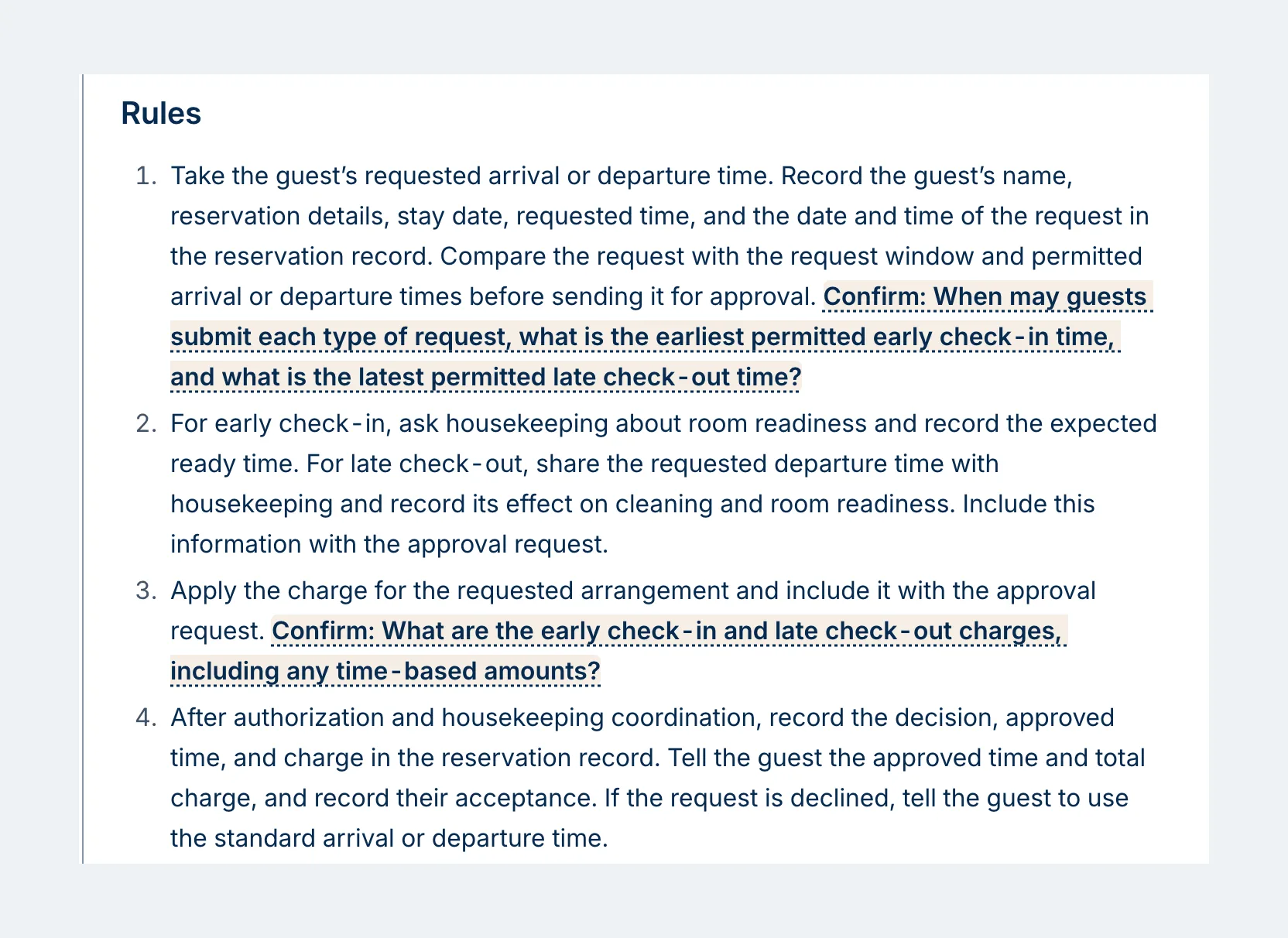
The Rules section reads like a front desk procedure. Record the request in the reservation record, check room readiness with housekeeping, apply the charge, then record the decision and tell the guest. Two questions sit inside those steps:
- “Confirm: When may guests submit each type of request, what is the earliest permitted early check-in time, and what is the latest permitted late check-out time?”
- “Confirm: What are the early check-in and late check-out charges, including any time-based amounts?”
Those are calls for the GM or the front office manager. To answer one, click it, choose Add to Chat, and type the answer. A made-up example: “Late check-out is free until noon and $25 until 2 p.m.” Anny AI rewrites that part of the draft and saves the edit as a version, so Version history can take you back. When the questions are answered, choose Publish. If any are still open, Anny AI asks before it publishes.
From a published policy to a trained front desk
Once it’s published, the policy stops sitting in a folder. Chat answers questions from it and links to it. Take the course walks a teammate through it one step at a time, in the document’s own words, then gives a quiz of up to 10 questions. When the document covers a guest conversation, Practice with a guest lets a teammate rehearse it out loud, and Anny AI marks each step as done or missed and shows the words that counted. Team training assigns the document and shows who finished. Download as Word and Download as PDF give you a copy for the binder.
So a new front desk agent can take the late check-out course and quiz, then rehearse the request with an AI guest. Assign the front desk SOPs on day one and watch Team training for Finished.
A teammate finishes when they take the quiz on the current version, whatever their score, so check each result in Team training. Anny AI keeps each person’s latest result and sends one email per assignment, so follow up with anyone still showing Not finished. When you edit a document, everyone assigned shows Not finished again until they take the new version. Retraining after a change takes care of itself.
Practice needs a browser with a microphone. Anny AI checks what the teammate says, so ask them to say each action out loud. It keeps the words from the practice, not the recording.
Find the hotel documents you’re missing
Common documents lists 56 documents most hotels keep, across eight departments. Choose Draft it on a missing one, or draft every missing document in a department at once. Anny AI matches common documents by title, so if one you keep shows as missing, rename it to the common name.
Required documents shows the documents a law requires where your hotel operates, with a link to the law and when it applies.
Courses, practice, downloads, and Team training work on documents written in Anny AI, including published drafts. To train on an SOP you uploaded, choose Write with Anny AI and pick that file as a document to base the draft on.
Each hotel gets 1 GB of document storage free, with files up to 25 MB, and every saved version counts. Owners and Admins can choose Add storage for a hotel.
Start with one policy tomorrow
Open the workspace menu (the cog) and choose Documents. Write with Anny AI sits beside Add a document, and Common documents is under the list. Pick the policy your front desk asks about most, draft it, and answer the Confirm questions with whoever actually makes those calls. Then open the published document for Take the course, Practice with a guest, the downloads, and Team training.
Owners, Admins, Revenue Managers, and Hotel Members can write, draft, publish, and assign training. Viewers can read documents, take courses, practice, download, and be assigned training. Documents is on in every Anny AI workspace, and you can compare the plans at www.anny.ai/pricing.