
A rate shop tells you what your competitors charge. It doesn’t tell you what a guest gets for that price. That lives in the listings: who includes breakfast, who charges for parking, who has a bar, and how guests rate each hotel on the sites they book from.
The Competitors tab on every hotel page in Anny AI puts that side by side. It opens with one table for your hotel and every hotel in your Comp Set, and you can narrow it to one competitor when you want a closer look.
Comparing competitor reviews by hand takes twenty browser tabs
To compare your hotel with five competitors by hand, you open each one on Google, Tripadvisor, Priceline, and Trip.com. That’s twenty tabs before you’ve looked at a single amenity. Then you copy the scores into a spreadsheet, and the spreadsheet has its own problem.
Review sites don’t use the same scale. Priceline scores out of 10, Google out of 5. A score also means more when thousands of guests stand behind it than when a few dozen do. Average everything into one number and you lose both.
What the Competitors tab shows
Anny AI keeps a profile of each hotel’s public listing and refreshes it as your shops run. The tab lines those profiles up for your hotel and every hotel in its current Comp Set.
Reviews show each site’s score on its own scale, with its review count. Amenities are marked Offered, Not offered, or Not listed for each hotel, with notes like “free” or “extra charge”. Hotel details covers check-in and check-out times, address, phone, website, and your team’s notes. Channels shows where your latest shop found each hotel, including the official site. Photos shows one photo per category for each hotel, labeled by what it shows, such as Exterior, Guest room, Swimming pool, or Fitness. And Collected evidence says when Anny AI last checked each hotel’s profile and channels.
Opening the tab reads what Anny AI already collected. It doesn’t run a shop or use credits.
From the whole Comp Set to one competitor
The tab opens on All competitors, with your hotel in the first column, marked Your hotel. Read across a row to see where you stand on one site or one amenity.
To look closer, choose a hotel from Compare with. The two-hotel view adds location scores for overall location, things to do, restaurants, transit, and airport access. It also puts the differences first. Amenities and channels where the two hotels differ sit at the top, and the rows they share fold away below.
Reading review scores across a Comp Set
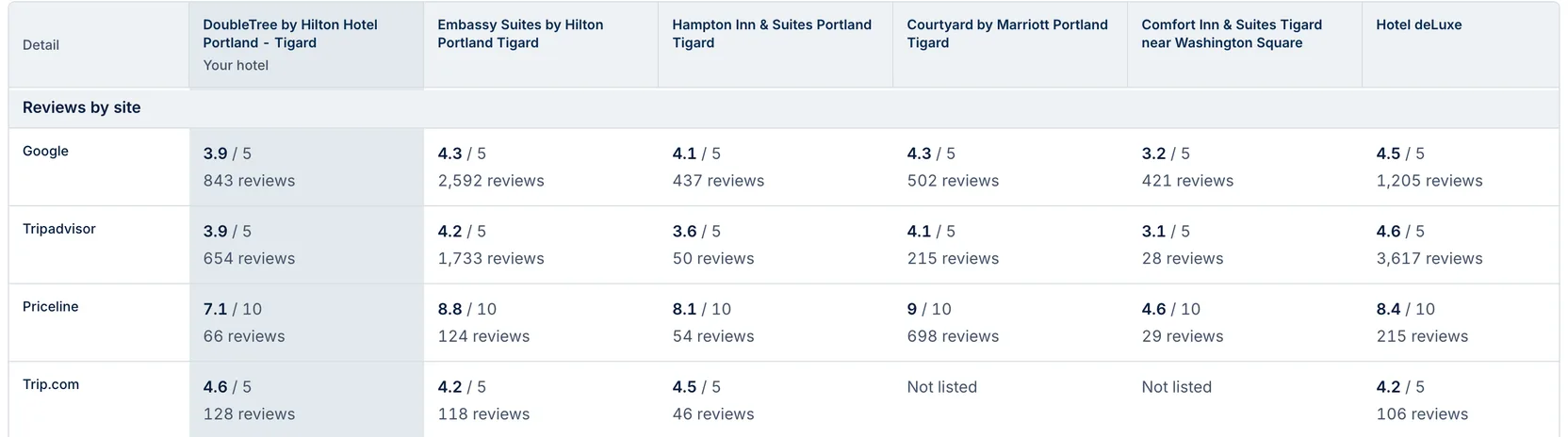
The first screenshot shows DoubleTree by Hilton Hotel Portland - Tigard and five competitors.
On Google, the DoubleTree has 3.9 out of 5 from 843 reviews. Embassy Suites by Hilton Portland Tigard has 4.3 from 2,592, and Hotel deLuxe has 4.5 from 1,205. On Priceline, the DoubleTree has 7.1 out of 10 from 66 reviews, and Courtyard by Marriott Portland Tigard has 9 from 698. On Trip.com, the DoubleTree’s 4.6 is the highest in the row, while Courtyard and Comfort Inn & Suites Tigard near Washington Square show Not listed.
If that were your hotel, Priceline is the interesting row. Sixty-six reviews is a small base, so a run of good stays moves that score faster than it would on Google, where 843 reviews stand behind it.
What a guest actually gets at each hotel
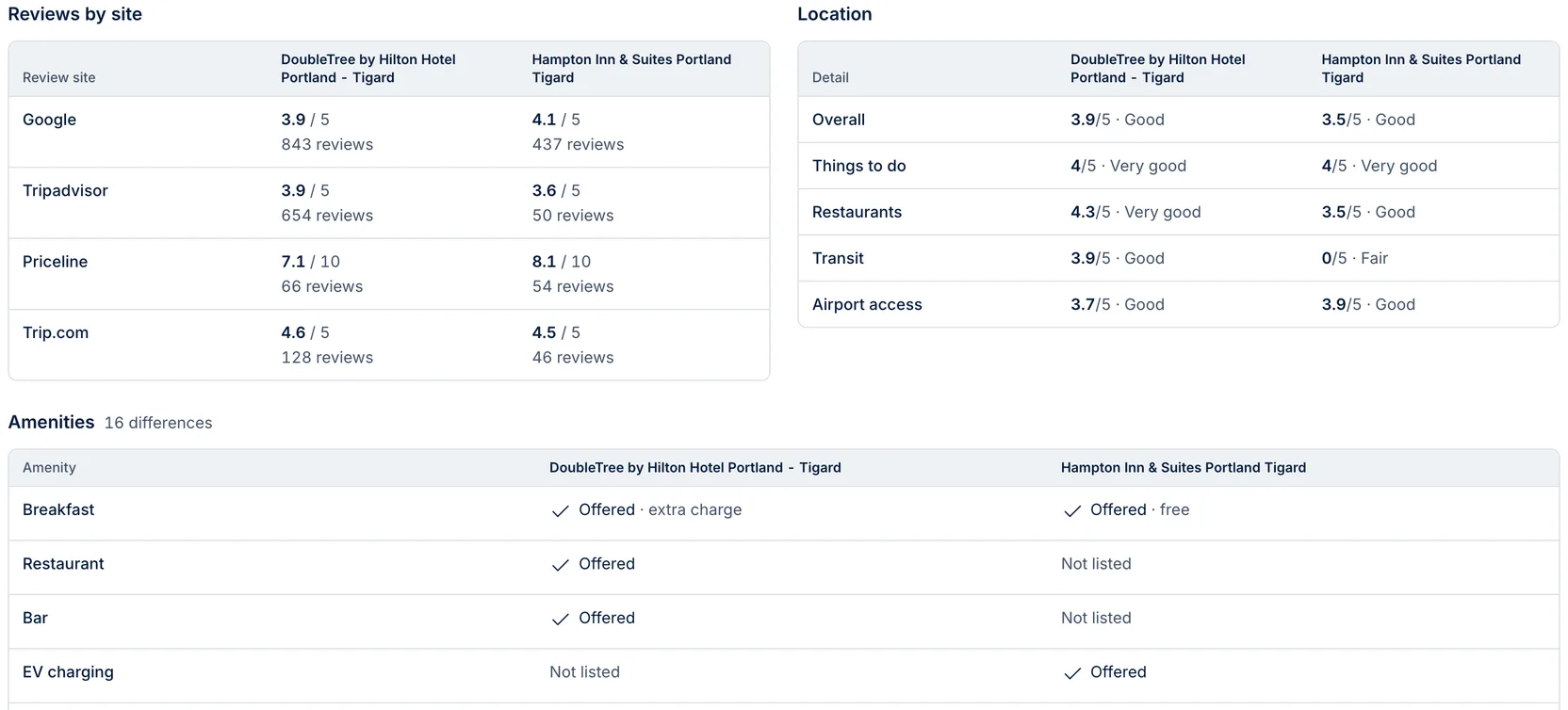
The second screenshot puts the DoubleTree beside Hampton Inn & Suites Portland Tigard. The Hampton leads on Google (4.1 against 3.9) and Priceline (8.1 against 7.1). The DoubleTree leads on Tripadvisor (3.9 against 3.6) and Trip.com (4.6 against 4.5). On location, the DoubleTree scores 3.9 overall against 3.5, and 4.3 for restaurants against 3.5.
The amenities are where it gets useful. Anny AI finds 16 differences. The DoubleTree lists breakfast at an extra charge, and the Hampton lists it free. The DoubleTree lists a restaurant and a bar, which the Hampton’s listing doesn’t mention, and the Hampton lists EV charging, which the DoubleTree’s doesn’t. Further down, the Hampton lists free self parking and the DoubleTree charges for it, while the DoubleTree lists room service and a local shuttle. Another 35 amenities are the same at both hotels.
If you ran the DoubleTree, that’s the context for any rate comparison with the Hampton. A guest comparing the two sees free breakfast and free parking on one side, and a restaurant, bar, and shuttle on the other. When you compare rates on the Dashboard, keep that guest’s real total in mind.
Not listed and Not offered mean different things
Not offered means the listing says the hotel doesn’t have the amenity. Not listed means the hotel’s public listing doesn’t mention it at all. So check a Not listed row against the hotel’s own site before you claim an advantage.
Dates can differ by hotel, and the Collected evidence rows show when Anny AI checked each one. A competitor you just added shows No profile yet until the next shop brings in its profile. Channels reflects your latest completed shop, with how many of its dates each channel listed the hotel.
The tab covers your hotel and its current Comp Set. To see another hotel here, add it to the Comp Set. For rates, open the Dashboard.
Start with your own listing
Go to Hotels, open your hotel, and choose Competitors. Then try these:
- Fix your own listing first. Look for rows where your hotel shows Not listed and competitors show Offered. If you offer it, update the listing.
- Check what’s included before you compare prices. Breakfast and parking change what a guest actually pays.
- Pick the review site to work on. Look for a low score with a small review count.
- Sense-check your Comp Set. A competitor that differs from you on most amenities may be a weaker fit than you thought.
- Keep notes beside each hotel, such as breakfast hours, in Hotel details. Owners, Admins, and Revenue Managers can edit them, and each edit shows Your team.
Everyone on your team who can open the hotel can use the tab. If the Comp Set is empty, people who manage Comp Sets see Add competitors in Settings.
Pair it with the rates your shops collect for the same hotels. See how rate shopping works at www.anny.ai/hotel-rate-shopping.